Export WooCommerce orders the way your workflow needs them
Create CSV, Excel, PDF, XML and JSON order exports with the fields, filters and column order your team needs — turn one-off exports into repeatable, automated workflows with Pro profiles, scheduling and automatic delivery.
Stop rebuilding the same WooCommerce reports by hand
Different teams need different data. Build an export once around the task, not around a spreadsheet you have to clean up.
Problem
Accounting needs the same report every month.
Solution
Save a Pro profile, schedule the recurring report and deliver it automatically to your team.
Feature used
Saved Export Profiles · Pro
Problem
Fulfilment doesn't need every order detail.
Solution
Select SKU, quantity, order number and shipping information in the preferred order.
Feature used
Field selection & column ordering
Problem
Different teams need different file formats.
Solution
Create a spreadsheet, PDF report or structured XML/JSON export.
Feature used
CSV · XLSX · PDF · XML · JSON
Problem
Standard fields aren't enough for your report.
Solution
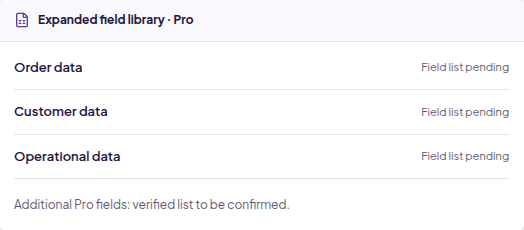
Pro expands the export field library for more detailed workflows.
Feature used
Additional Export Fields
Problem
You know what you need, not which filters to rebuild.
Solution
Describe an export through supported AI tools, then review the interpreted configuration.
Feature used
AI-assisted exports
Problem
Your AI assistant needs focused export tools.
Solution
Use authorized MCP connections to discover fields, preview matching orders and generate exports.
Feature used
MCP-based export workflows
Built for operations
Build exports around the way your business works
Filters, fields, columns and formats work together to produce a file your team can actually use.
01
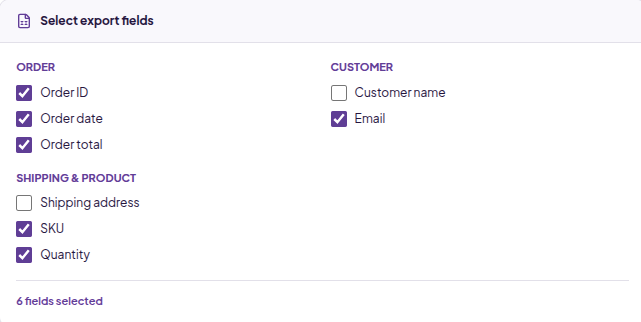
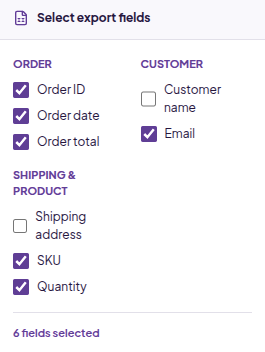
Choose the data your team actually uses
Select order, customer, billing, shipping and product information without filling the export with unnecessary columns.
Grouped fields for easier selection
Order information and customer details
SKUs, quantities, totals and payment information
02
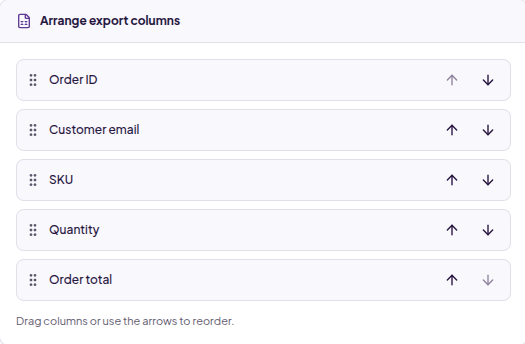
Make the exported file match your workflow
Arrange your columns before exporting. Put identifiers first, keep related data together and match the layout your downstream workflow expects.
Draggable column ordering
Only your selected fields
An export ready for your team
03
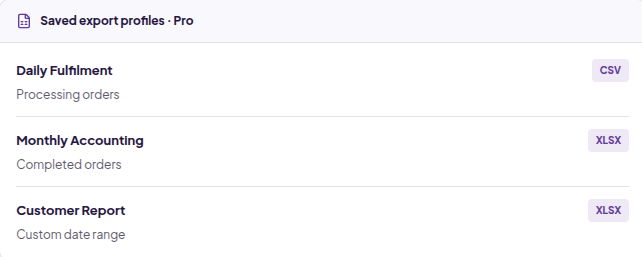
Save recurring exports instead of rebuilding them
Pro saves your filters, selected fields, column order and file format as a reusable profile. Monthly accounting and daily fulfilment can each have their own setup.
Available in Pro
Reuse complete export configurations
Separate profiles for different workflows
04
Go beyond the standard export field set
Pro adds export fields for businesses that need more detailed operational reports.
Additional fields available
Expandable export field library
The details that make exports useful
Date-range filtering
Order-status filtering
CSV & Excel / XLSX
PDF reports
XML & JSON
Customer information
Billing & shipping details
Product SKUs & quantities
Order & line totals
Coupon information
Payment information
Draggable column order
Export confirmation
Batch processing
HPOS compatibility
How it works
From WooCommerce orders to the file your team needs
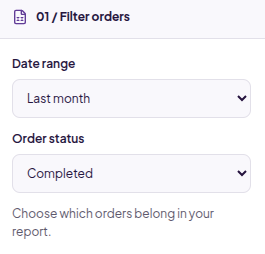
01
Filter your orders
Choose a date range and order status for the report you need.
02
Select your fields
Choose order, customer, shipping and product data.
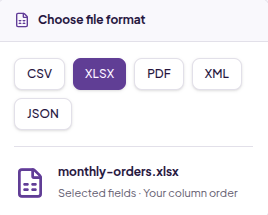
03
Choose your format
Select CSV, Excel, PDF, XML or JSON for your workflow.
04
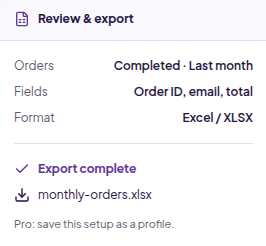
Review and export
Confirm the filters and columns, then generate your file.
Available in Pro
Turn recurring exports into reusable workflows
Save commonly used filters, fields, column order and export format as a profile so you do not need to rebuild the same export every time.
CSV
Daily Fulfilment
Processing orders
Order ID · SKU · Qty · Shipping address
XLSX
Monthly Accounting
Completed orders
Order date · Customer · Total · Tax · Payment method
Schedule exports and send them where your team already works
Create recurring export schedules and automatically deliver generated files to supported external destinations without manually downloading and moving files.
Export order IDs, SKUs, quantities, shipping information and shipping methods without unrelated columns.
Capabilities used
Status filters
Selected fields
CSV
Pro profiles
Scheduled delivery
1Filter processing orders
2Choose SKU, quantity and shipping fields
3Export a CSV for fulfilment
4Reuse the configuration with a Pro profile
Prepare structured reports for accounting
Bring together order totals, tax, discounts and payment details for recurring accounting workflows.
Capabilities used
Date filters
Column ordering
Excel / XLSX
1Choose the accounting date range
2Select totals, tax and payment data
3Arrange the reporting columns
4Export an Excel file
Keep day-to-day order reporting practical
Export order and customer information for internal analysis and daily operational reviews.
Capabilities used
Order data
Customer data
Five formats
1Define the orders to review
2Select order and customer fields
3Choose the team's preferred format
4Review and generate the report
Bring customer and order information together
Create focused customer reports using the contact and order information required for your task.
Capabilities used
Customer details
Field selection
Date filtering
1Choose a reporting period
2Select the customer details needed
3Include relevant order information
4Export for your customer workflow
Export structured data for downstream systems
Use XML or JSON when a structured file fits better than a spreadsheet. Choose only the order information the receiving workflow requires.
Capabilities used
XML
JSON
Controlled field selection
1Filter the relevant orders
2Choose the required data
3Select XML or JSON
4Review the file before sharing
AI & MCP
Ask for the export you need
Conversational order-export workflows through AI-assisted tools and MCP-compatible clients. Describe
the report, review the interpretation and choose what to export.
Ask
Review
Export
Core AI & MCP are also in Free.
Free works with standard export fields and core export functionality. Pro gives AI access to a
broader field set and richer export capabilities, alongside reusable profiles, scheduling and
automated delivery.
Free · Core field set
“Export completed orders from last month with order ID, email and total.”
Review interpreted fields and filters before generating or sharing the file. Pro examples describe a
workflow goal; direct AI-triggered scheduling is not confirmed.
Connections require authorization. The workflows shown focus on reading and exporting order data,
not arbitrary editing or deletion. You control the data requested and shared.
Lite vs Pro
Start free. Upgrade when exports become part of your workflow.
Free is a useful manual export tool with standard fields and core AI/MCP. Pro adds more data, more automation and recurring export workflows.
Feature comparison between the Free and Pro versions
If the plugin does not meet your requirements, you can request a refund within 30 days of the original purchase according to the refund policy.
FAQ
Questions about Export Orders
Which export formats are supported?
CSV, Excel / XLSX, PDF, XML and JSON.
Can I choose which WooCommerce fields to export?
Yes. Select the order, customer, billing, shipping and product information required for your export.
Can I change the order of exported columns?
Yes. Arrange your selected fields before generating the file.
Can I filter orders by date and status?
Yes. Date-range and order-status filters help you limit exports to relevant orders.
What are saved export profiles?
Pro profiles store filters, fields, column order and format so recurring exports can reuse the same configuration.
What extra features are included in Pro?
Pro includes Saved Export Profiles, additional export fields, more capable AI-assisted workflows, enhanced MCP, scheduled exports and automatic delivery to Google Drive, Dropbox and Custom FTP.
Can I schedule recurring exports?
Yes. Pro supports scheduled exports and automatic file delivery, so recurring reports do not require repeated setup, downloads or manual handoffs. Exact schedule options should be checked in the product documentation.
Where can Pro deliver exports?
Google Drive, Dropbox and Custom FTP are supported destinations. More destinations planned for future releases.
Is AI or MCP exclusive to Pro?
No. Free includes core AI-assisted exports and MCP functionality with standard export fields. Pro expands field access and export capabilities, enabling richer AI-assisted and enhanced MCP workflows. Direct AI-triggered scheduling is not confirmed.
Which additional fields are available in Pro?
Custom fields, Order Meta Fields and Item Meta fields are available for exports in addition to the standard fields available in lite version
Is WooCommerce HPOS supported?
Yes. Export Orders supports WooCommerce High-Performance Order Storage.
Can I export large numbers of orders?
Batch processing supports larger export jobs. Practical limits depend on the store and hosting environment.
Can I use ChatGPT or Claude with Export Orders?
MCP-compatible clients can support conversational export workflows through an authorized connection.
What is MCP?
Model Context Protocol lets compatible AI clients connect to a defined set of tools, such as order-export tools, through an authorized connection.
Does AI have permission to edit or delete my WooCommerce orders?
The workflows presented here focus on reading and exporting order data, not arbitrary editing or deletion. Review the actual authorized tools and requested data before connecting.
Do I need an AI account for normal exports?
No. Normal manual exports do not require an AI account.
Can I use Export Orders without AI?
Yes. Configure filters, fields, columns and formats directly in WooCommerce.
What support is included?
We help with installation, plugin configuration, export setup, and troubleshooting issues with Export Orders for WooCommerce. If an export isn’t working as expected, contact us with the details and we’ll help investigate.
Custom development, bespoke integrations, and issues caused by other plugins or your hosting environment are outside standard support.
More fields. More capable AI. Reusable profiles. Scheduled exports. Automatic delivery. Turn one-off WooCommerce exports into repeatable data workflows with Pro.
We use cookies on our website to give you the most relevant experience by remembering your preferences and repeat visits. By clicking “Accept”, you consent to the use of ALL the cookies.
This website uses cookies to improve your experience while you navigate through the website. Out of these cookies, the cookies that are categorized as necessary are stored on your browser as they are essential for the working of basic functionalities of the website. We also use third-party cookies that help us analyze and understand how you use this website. These cookies will be stored in your browser only with your consent. You also have the option to opt-out of these cookies. But opting out of some of these cookies may have an effect on your browsing experience.
Necessary cookies are absolutely essential for the website to function properly. This category only includes cookies that ensures basic functionalities and security features of the website. These cookies do not store any personal information.
Any cookies that may not be particularly necessary for the website to function and is used specifically to collect user personal data via analytics, ads, other embedded contents are termed as non-necessary cookies. It is mandatory to procure user consent prior to running these cookies on your website.