
Custom Payment Gateways for WooCommerce has been helping store owners create payment methods that fit their business workflows instead of being limited to traditional online payment gateways.
Over time, the Pro version has grown to support much more than simply adding a custom payment option. It includes flexible gateway configuration, gateway-specific checkout fields, fees, instructions, order behavior, shipping-related restrictions and other settings designed for custom payment workflows.
At the same time, we recognize that updates to the Pro version have not been as regular as they should have been recently, and our support response times have also fallen short in some cases.
We are addressing both.
Starting with our August 2026 release, Custom Payment Gateways for WooCommerce Pro is returning to active and regular development, with a stronger focus on compatibility, maintenance, support and meaningful product improvements.
This page will serve as our public development update and will be revised regularly as new improvements are released.
Ongoing WooCommerce Compatibility
Since the initial release of Custom Payment Gateways for WooCommerce, we have continued maintaining the plugin to keep it compatible with changes introduced across WordPress and WooCommerce.
WooCommerce has evolved significantly over the years, particularly around checkout, order storage and payment processing. We have continued adapting the plugin as these changes have been introduced.
This includes support and compatibility work around areas such as:
- High-Performance Order Storage (HPOS)
- WooCommerce Cart & Checkout Blocks
- Classic WooCommerce Checkout
- Changes to WooCommerce payment gateway APIs
- Current WordPress releases
- Current PHP versions
Our goal is to ensure that merchants can continue using their custom payment gateways as WooCommerce evolves.
Compatibility work is not something we consider complete after a single release. It is an ongoing part of maintaining a payment-related WooCommerce extension, and this will remain one of our core priorities going forward.
August 2026 — Maintenance, Security & Compatibility
Status: Released
Our immediate priority has been strengthening the foundation of the plugin and bringing the Pro version back into a more regular maintenance cycle.
The latest release focuses on:
- Compatibility with current WooCommerce releases
- WooCommerce 11.x testing
- High-Performance Order Storage (HPOS)
- Cart & Checkout Blocks
- Classic WooCommerce Checkout
- Current WordPress compatibility
- PHP 8.x compatibility
- Security hardening
- Code maintenance and cleanup
- Review of gateway settings and submitted payment fields
- Improved validation and sanitization
- Compatibility-related fixes where required
Security and compatibility will continue to be treated as ongoing responsibilities rather than one-time improvements.
What We’re Working on Next
Rather than publishing every implementation detail or committing to an overly rigid feature schedule, we want to share the broader areas where development is heading.
Our priorities are focused on making the plugin:
- Easier to manage
- More flexible
- More scalable for stores with multiple gateways
- Better suited to complex manual and alternative payment workflows
- Address any immediate security concerns that come up
Q4 2026 — More Powerful Gateway Configuration
One of our major areas of development is improving the way gateway availability and configuration rules work.
We plan to build on the existing order amount, shipping and availability controls with more flexible conditions and combinations.
The goal is to make it easier to decide exactly when a payment gateway should or should not appear without requiring custom code.
We are also working on improvements to the existing custom field and fee systems, particularly around more advanced configuration, validation and flexibility.
Q4 2026 — Easier Management of Multiple Gateways
As stores add more custom payment methods, managing each gateway individually can become time-consuming.
We are therefore working toward a more streamlined administration experience for stores using multiple gateways.
Areas under development include:
- Better gateway overview and management
- Bulk configuration tools
- Easier duplication of existing gateways
- Faster ways to reuse common settings
- Improved organization of gateway settings
- Easier management of fields and fees across multiple gateways
This area is especially important for agencies, developers and larger WooCommerce stores.
2027 — Better Payment Workflows
We also plan to continue expanding the plugin beyond basic gateway creation.
Future development will focus on making Custom Payment Gateways Pro more useful for businesses where payment happens partially or completely outside WooCommerce.
This includes areas such as:
- Improved payment instructions
- More flexible order workflows
- Better handling of manual payment confirmation
- Improved communication with customers after checkout
- More flexible use of order and customer information
- Better administration of custom payment processes
2027 — Reusable & Portable Configuration
Another area we are exploring is making gateway configurations easier to reuse.
This includes improvements around:
- Copying settings between gateways
- Reusing common configurations
- Importing gateway settings
- Exporting gateway settings
- Moving configurations between development, staging and production websites
- Reusing configurations across multiple stores
These tools should be particularly useful for agencies and Unlimited Sites customers.
Improving the Administration Experience
Custom Payment Gateways Pro already contains a large number of configuration options.
As the plugin continues to grow, simply adding more settings is not enough.
We want to make the existing functionality easier to understand and manage.
Future interface improvements will focus on clearer organization around areas such as:
- General gateway settings
- Availability
- Instructions
- Checkout fields
- Fees
- Order handling
Our goal is to make complex gateway setups easier to configure without reducing the flexibility already available in the plugin.
Our Compatibility Commitment
WooCommerce continues to evolve, and ongoing compatibility is an important part of maintaining any payment-related extension.
Going forward, we intend to perform regular compatibility reviews against current WooCommerce and WordPress releases.
Our testing process will increasingly cover areas such as:
- Current WooCommerce releases
- Current WordPress releases
- Classic Checkout
- Cart & Checkout Blocks
- HPOS
- Guest checkout
- Logged-in checkout
- Physical products
- Virtual products
- Custom gateway fields
- Gateway fees
- Order emails
- Thank You pages
- My Account
- Supported PHP versions
When changes in WooCommerce require updates to Custom Payment Gateways, compatibility and stability work will take priority over planned feature development.
A More Regular Release Cycle
One of the most important improvements we are making is not a specific feature.
It is how the plugin is maintained.
Going forward, our goal is to perform regular compatibility and maintenance reviews, rather than allowing long periods between Pro updates.
Our current approach is:
Compatibility and maintenance reviews: Ongoing
Feature releases: Released regularly when meaningful improvements are ready
Security fixes and critical compatibility issues will be prioritized whenever necessary.
This page will also be updated as development progresses so customers have a clear indication that the plugin continues to be actively maintained.
Improving Pro Support
We are also reviewing our Pro support process.
There have been instances where customers did not receive the response they should have received, and this is something we are actively correcting.
Our goal is to provide more consistent and timely responses, particularly for issues involving:
- Checkout failures
- Payment gateway availability
- WooCommerce compatibility
- Plugin updates
- Security concerns
Support is an important part of the Pro product, and improving support consistency is part of this renewed development effort.
Where We’re Taking Custom Payment Gateways
Our long-term goal is not simply to provide another way to add a payment option to WooCommerce.
We want Custom Payment Gateways Pro to become a flexible toolkit for building and managing custom manual and alternative payment workflows without writing code.
The direction can be summarized in five areas:
Create
Build custom payment methods that match the way your business accepts payments.
Control
Decide when each payment method should be available.
Collect
Collect different information for different payment gateways.
Configure
Control fees, instructions, emails and order behavior.
Manage
Make it easier to manage, reuse and maintain multiple gateway configurations.
We will continue updating this page as improvements are released.
Thank you to everyone who uses Custom Payment Gateways for WooCommerce, reports issues and shares feedback with us.
Your feedback will continue to play an important role in where we take the plugin next.
There may be instances where you want to add additional data whenever a product is added to the cart. This additional data could be the file selected while adding a product to the cart as we do in the case of WooCommerce Addon Uploads Pro. In such cases, the best place to store the data for further processing would be Cart Item Meta.
Adding cart item meta
To add cart item meta the best filter which WooCommerce provides is woocommerce_add_cart_item_data. This filter is triggered when an add to cart action is triggered. Let’s understand the parameters available with this filter. The filter description is:
apply_filters( 'woocommerce_add_cart_item_data', $cart_item_data, $product_id, $variation_id );The cart item data is the object that will hold the custom data that is being passed during an add to cart operation.
Example usage of the filter is as below:
function img_sol_add_cart_item_data( $cart_item_data, $product_id, $variation_id ) {
    $cart_item_data['meta1'] = $_POST['meta1'];
    $cart_item_data['meta2'] = $_POST['meta2'];
    return $cart_item_data;
}
add_filter( 'woocommerce_add_cart_item_data', 'img_sol_add_cart_item_data', 99, 3 );
Updating Existing Cart Meta Data
Now that you have added custom meta data to your items added to the cart, what if you want to update the value of this meta data?
A typical use case for this could be allowing users to edit some of the options while on the cart page. In that case you can use the below function to alter your WooCommerce Cart Item Meta data values:
function prefix_update_existing_cart_item_meta() {
    $cart = WC()->cart->cart_contents;
    foreach( $cart as $cart_item_id=>$cart_item ) {
        $cart_item['meta1'] = 'New value to be updated';

        WC()->cart->cart_contents[ $cart_item_id ] = $cart_item;
    }
    WC()->cart->set_session();
}
In the above code snippet, we are getting the WooCommerce cart contents using cart_contents property. We then loop through each item and update the cart item meta.
Please note that the entire cart item present in $cart_item object needs to be updated back.
The final save happens using set_session function on the WooCommerce Cart object.
Please let me know in the comments below if the code is functioning fine for you or not or if you are facing any errors.
The Orders listing table in WooCommerce available under WooCommerce > Orders is a basic one and has only a few fields. Here is how it looks by default:
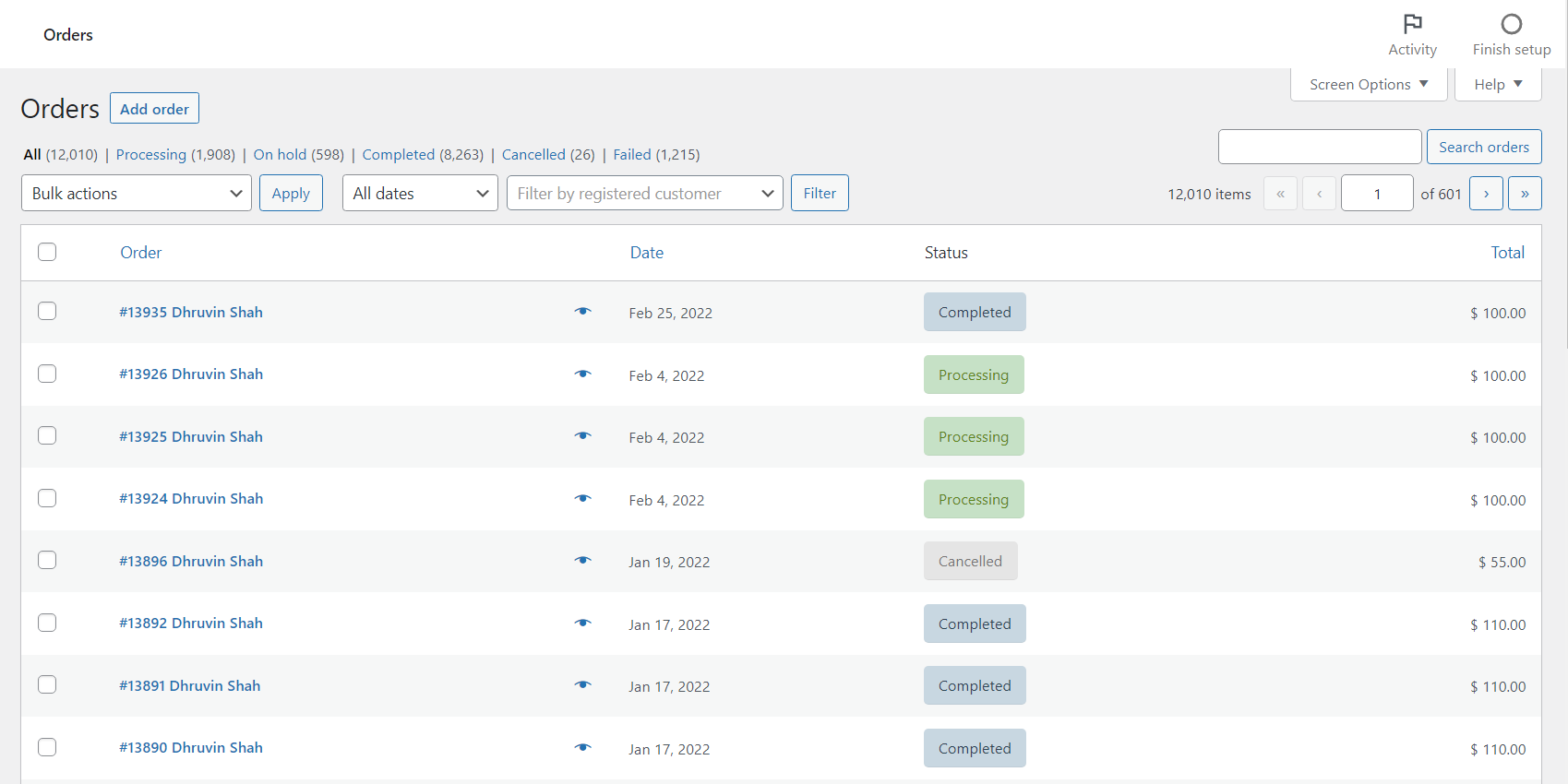
Now you may wonder that this much information might be too less and it would be great if some more information was available on this page.
WooCommerce by default does have the provision to show more fields but they are disabled. The other fields that can be available on this page are:
- Billing
- Ship to, and
- Actions
How to enable these missing fields?
On the Orders screen, there is a button called “Screen Options”. Something like this:

When you click this option you will be able to see the missing fields that I listed above:
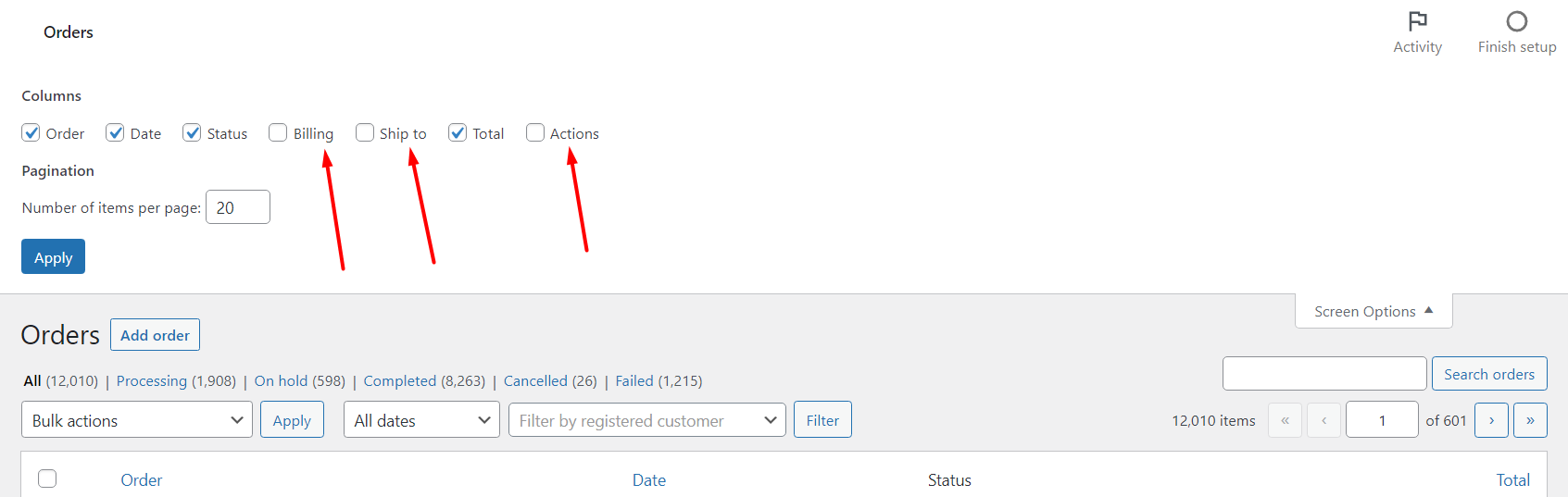
Select the fields which you want to enable and click on Apply. Once done, the columns will be displayed in the table.
The Actions column is very much useful for store owners in marking the orders completed and it is recommended that they enable it from here.
How to add custom columns to WooCommerce Order Table?
Now that you enabled a few columns available by default, let’s add a few more columns that you might want to have it on the order listings page.
The example listed below can be used to add any columns related to WooCommerce orders. We will be using the payment gateways as the column to be displayed. The payment gateways could be any payment gateway or a custom payment gateway created using Custom Payment Gateways for WooCommerce.
You can add the below mentioned code in the functions.php file of your child theme or use a plugin like the Code Snippets plugin.
Add a column header
You can add a column using the manage_edit-{$post_type}_columns filter that is available in WordPress. Since Orders (shop_order) are custom post types as well, our resulting filter would be manage_edit-shop_order_columns. Here is what the code would look like:
add_filter( 'manage_edit-shop_order_columns', 'is_add_new_order_admin_list_column' );

/**
 * Add column key and label.
 *
 * @param array $columns Columns.
 * @return array
 */
function is_add_new_order_admin_list_column( $columns ) {
	$columns['payment_gateway'] = 'Payment Gateway';
	return $columns;
}
This would add a new column with a header as Payment Gateway as shown below:
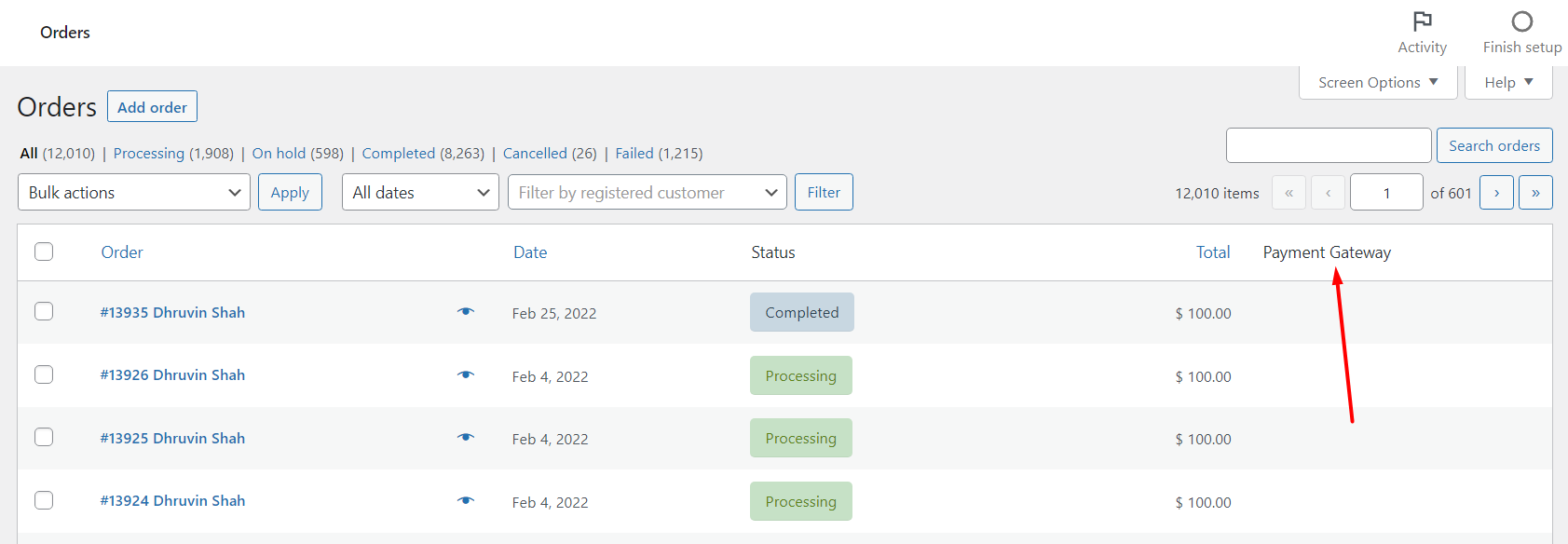
As you can see above that the column has been added but there is no data present in those columns.
Populating the column with data
Like manage_edit-{$post_type}_columns we have another default hook from WordPress that will help us with populating the data. The hook is manage_{$post_type}_posts_custom_column
Here is how to apply the code and get the payment gateways:
add_action( 'manage_shop_order_posts_custom_column', 'is_payment_gateway_column_content' );

/**
 * Add Payment Gateways used in the column data.
 *
 * @param string $column Column Key.
 * @return void
 */
function is_payment_gateway_column_content( $column ) {

	global $post;

	if ( 'payment_gateway' === $column ) {
		$order = wc_get_order( $post->ID );
		echo esc_html( $order->get_payment_method_title() );
	}
}
To get the payment gateway we will need the WC_Order object and that can be created using wc_get_order function. The Order ID can be obtained from the global $post object.
Once an Order object is created, the payment gateway title can be obtained using the get_payment_method_title function.
The payment gateways would now be visible in the columns:
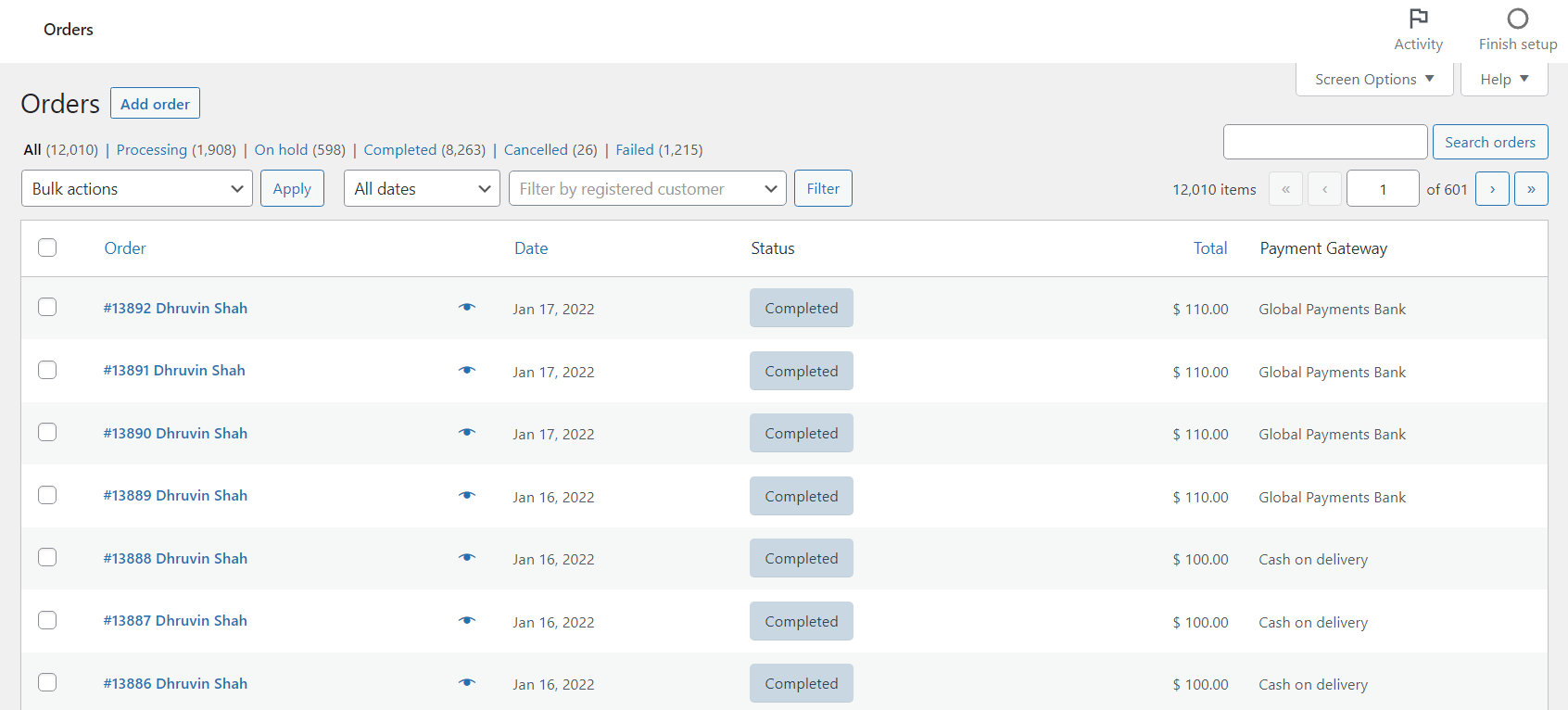
As you can see above, the Custom Payment Gateways created too are visible in the columns.
Using the above method, you can set some other columns as well based on your requirements such as the Shipping method of the order or the items present in the order, or any other custom information stored within the order.
Do let us know in the comments below how it goes with the above code at your end or any difficulties faced while adding the code snippet.
Our plugins for WooCommerce



We are halfway into 2021 and this might be the first time I might be sharing a monthly update on our plugins. That is because I have decided to dedicate full time on these plugins. Let me quickly share the June updates with you 🙂
Last month we released updates to two of our plugins:
Custom Payment Gateways for WooCommerce
In Custom Payment Gateways for WooCommerce, we added the following improvements:
- Title and description fields of the payment gateways created were not available for translation. This has been fixed.
- When using the plugin with WPML, and if input fields were present then the field was not visible for these custom payment gateways when the language was changed.
- Stock quantities were not getting reduced correctly when an order was placed. This was due to fact that the stock quantities need to updated via the data stores. This has now been fixed.
- In addition to the above we refactored the code in compliance with WPCS core standards.
- We also tested the plugin with latest versions of WooCommerce and WordPress and updated the tested up to tags.
Variation Radio Buttons for WooCommerce
- The plugin is now compatible with WooCommerce Quick View Pro Plugin by Barn2. The variations would be available for selection in the lightbox. This change also ensures that the plugin is compatible with WooCommerce Product Tables by the same author Barn2.
- Similar to Custom Payment Gateways, we refactored the code in compliance with WPCS core standards for this plugin as well.
- We also tested the plugin with the latest version of WooCommerce and WordPress and updated the tested up to tags.
July Plans
For July we have some exciting updates planned for our plugins.
WooCommerce Addon Uploads Pro would have the option to charge for each uploads. We are also planning to release an update for Custom Shipping methods for WooCommerce with some performance improvements and code refactoring. The same might go for Payment Gateway by User Roles plugin.
Are you looking for any specific feature to be added to our plugins? Please drop in a comment below and we will surely evaluate your request. For other queries or concerns please fill the form on this page and we will get back to you. I hope you too had a good June.
WooCommerce Addon Uploads Pro allows users to upload multiple files while adding products to cart. We introduced this feature in version 3.0.0 of the plugin.
But the multiple file uploads were restricted to a single input field. This caused a not so good experience for some of the end users as they were unable to determine that they had to select multiple files.
With version 3.1.0 we decided to split the multiple file uploader to show multiple file upload options based on the maximum value set. Here is the screenshot on how the new upload would look like:
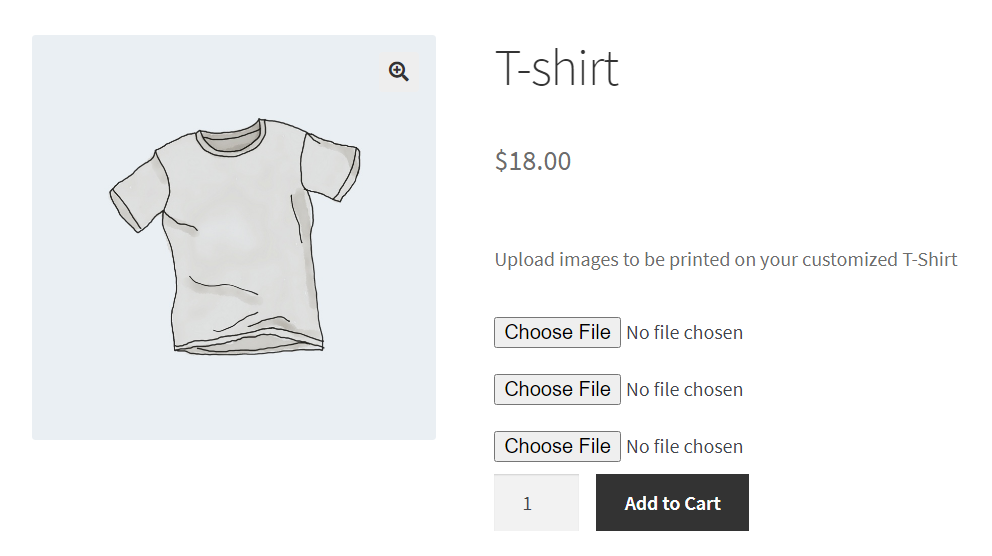
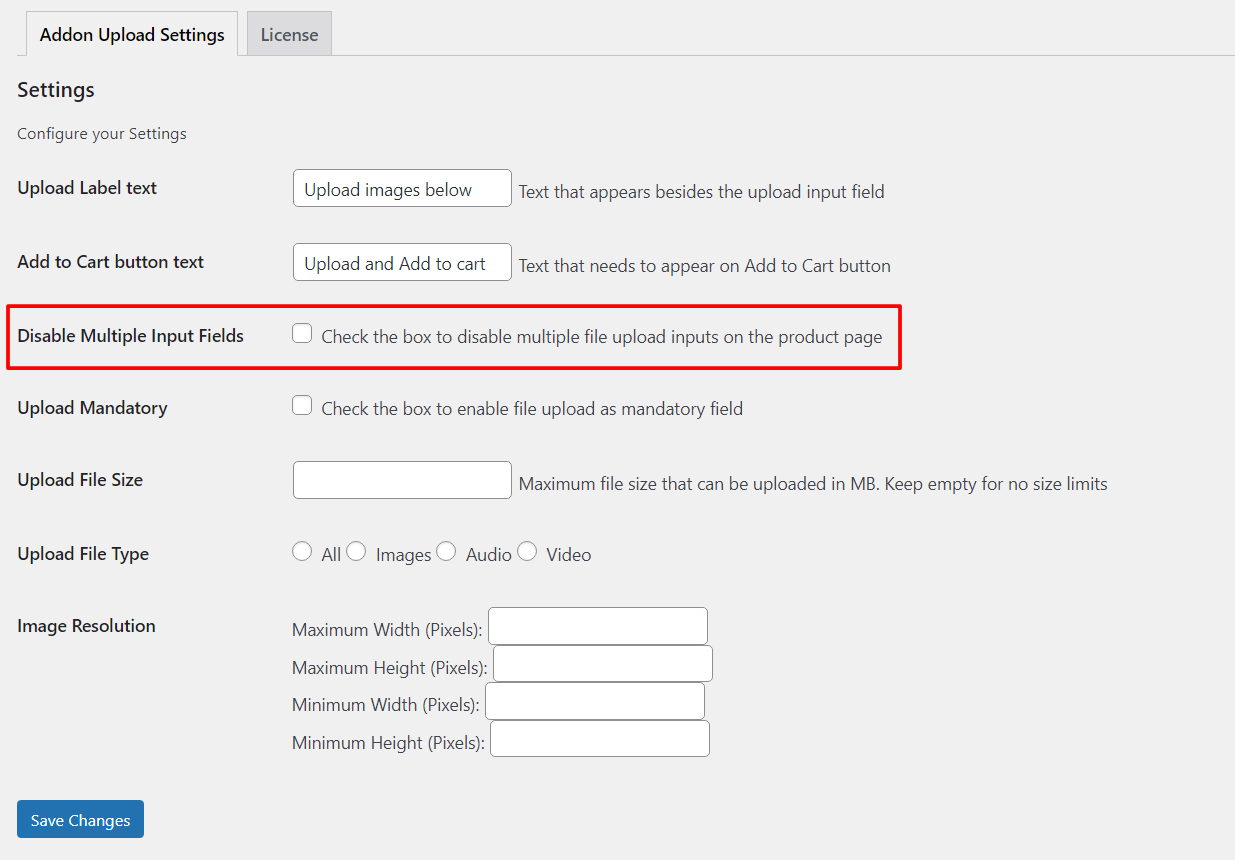
Existing customers would automatically be able to see this view but there would be cases where you would want to switch between an older view. If that is the case, then no worries at all. You can easily do that by enabling a setting from the addon settings.
Here is a screenshot of the setting:
We are working on making the plugin much better with much more improvements in the coming release. If you are looking for any specific feature then please do mention via the comments below or contact us here.