WooCommerce manages orders. Your warehouse needs more.
WooCommerce handles ecommerce inventory well. Add the physical processes that connect a stock quantity to the work on your warehouse floor.
Problem
Stock quantities do not tell staff where to look.
Solution
Track stock by warehouse, bin and physical location.
Feature used
Problem
Picking starts by manually reading each order.
Solution
Turn WooCommerce orders into structured pick lists.
Feature used
Problem
Incoming vendor stock lives in spreadsheets.
Solution
Connect purchase orders with receiving into warehouse locations.
Feature used
Problem
Warehouse movements lose their context.
Solution
Record transfers between locations with a traceable reference.
Feature used
Problem
Packing and shipping status is hard to follow.
Solution
Move orders through defined pick → pack → ship stages.
Feature used
Problem
Stock adjustments lack enough history.
Solution
Keep quantities, reasons and references in an inventory trail.
Feature used
The connected warehouse workflow
One workflow from purchasing stock to shipping the order
01 / 06
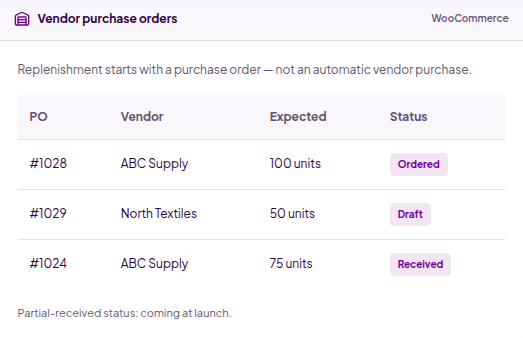
Create a vendor purchase order
Record the vendor, products and expected quantities. Keep replenishment connected to the warehouse.
Illustrative workflow · No stock or orders are changed
Vendor purchase orders
WooCommerce
Replenishment starts with a purchase order — not an automatic vendor purchase.
PO
Vendor
Expected
Status
#1028
ABC Supply
100 units
Ordered
#1029
North Textiles
50 units
Draft
#1024
ABC Supply
75 units
Received
Partial-received status: coming at launch.
Built for the warehouse floor
Control the stock. Connect the work.
Practical operational screens for physical inventory, replenishment and fulfilment. All examples use fictional warehouse data.
01
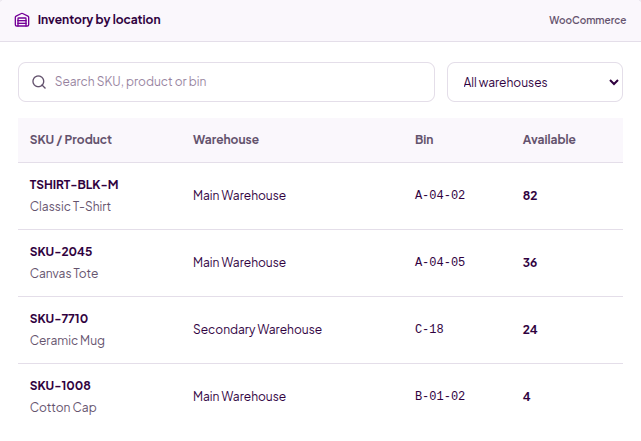
Know what you have — and where it is
See products and SKUs across warehouses and bins. Find available stock without asking someone who happens to know the shelves.
Search by product, SKU or bin
Filter inventory by warehouse
View stock availability by location
02
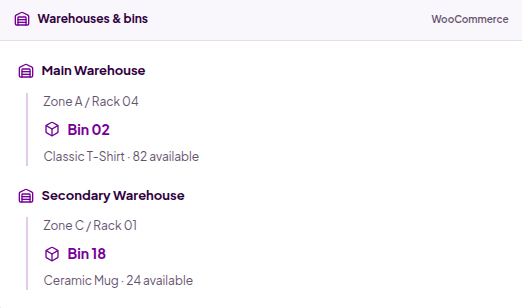
Organize stock around your real warehouse layout
Give products a clear physical home. Use a practical warehouse → zone / rack → bin hierarchy, not a complicated graphical floor plan.
Multiple warehouses and stock locations
Bins that reflect your physical shelves
Consistent location references for warehouse staff
03
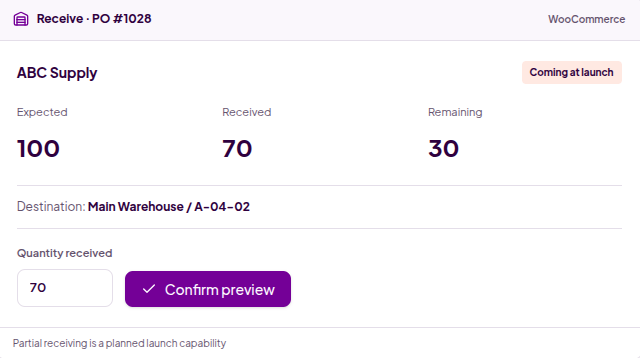
Receive incoming stock against purchase orders
Connect vendor deliveries to expected quantities and the right warehouse destination. The launch preview shows how a partial receipt could keep the remaining balance visible.
Choose destination warehouse and bin
Confirm quantities against a purchase order
Partial receiving: coming at launch
04
Manage replenishment before stock runs out
Keep vendor records, purchase-order items and incoming deliveries in one workflow. Create orders deliberately; no automated vendor ordering is implied.
Vendor records and expected quantities
Draft → Ordered → Received status
Partial-received status: coming at launch
05
Turn WooCommerce orders into efficient pick workflows
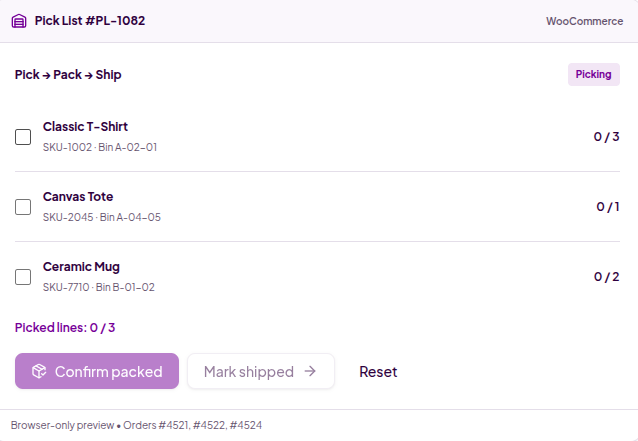
Give warehouse staff a list of products, SKUs, bins and required quantities. Confirm each line, then move the picked items into packing.
Pick lists connected to WooCommerce orders
Required and picked quantities side by side
Confirm picked items before packing
06
Confirm every item before the order leaves
Move the order from picked to packed to shipped. Warehouse fulfilment remains connected to WooCommerce without becoming a separate carrier platform.
Confirm items at the packing stage
Track Ready to Ship and Shipped status
No carrier labels or box optimization claims
07
Move inventory with a clear record
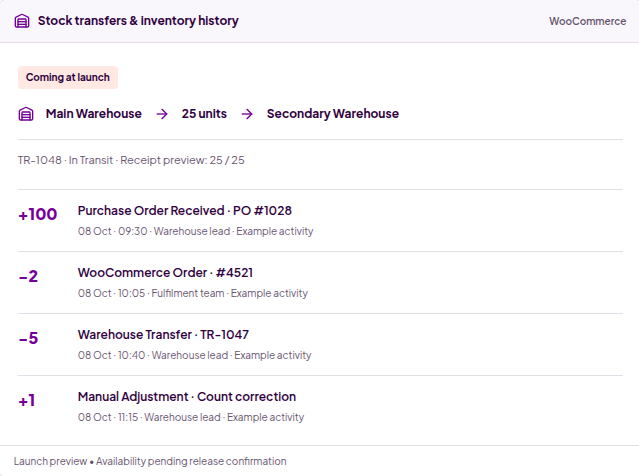
The launch preview connects warehouse transfers with inventory history, so movements are never just silent changes to a stock total.
Transfer references and receipt quantities
Adjustments with a reason, time and reference
Transfers and inventory history: coming at launch
Coming at launch / planned
More operational control, as the product grows
The following capabilities are being developed. They are not presented as already released.
Planned capability
Move faster with scan-based workflows
Scan a bin, scan a product and confirm the quantity. Browser/device-friendly barcode and QR workflows are planned, with hardware support to be confirmed.
Scan-based workflow
WooCommerce
Coming at launch
TSHIRT-BLK-M
Scan Bin
Scan Product
Confirm Quantity
Planned • Device and scanner support pending testing
Planned capability
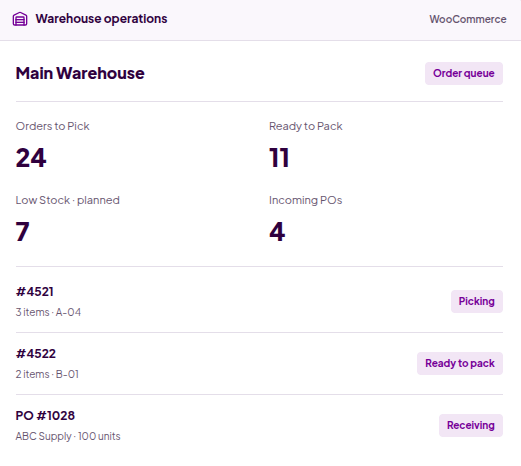
See stock risk before it becomes a problem
Low-stock thresholds, reorder indicators and purchase-order prompts are planned. Replenishment decisions stay with your team — no automated vendor purchases.
Warehouse operations
WooCommerce
Main Warehouse
Order queue
Orders to Pick
24
Ready to Pack
11
Low Stock · planned
7
Incoming POs
4
#4521
3 items · A-04
Picking
#4522
2 items · B-01
Ready to pack
PO #1028
ABC Supply · 100 units
Receiving
Illustrative operational preview
Planned capability
Give warehouse teams clear ownership
Lightweight pick-list and receiving-task assignment is planned. Keep ownership and task status clear without a complex workforce-management system.
Warehouse task ownership
WooCommerce
Planned
Pick List #PL-1082
Warehouse team A
Picking
Receive PO #1028
Warehouse team B
Waiting
An operational dashboard — not vanity charts
Orders to pick, orders to pack, incoming shipments and open transfers help focus attention on work. Advanced operational reporting is planned.
Use cases
Built for WooCommerce businesses managing physical stock
A clear path from order to dispatch
For stores fulfilling WooCommerce orders from their own warehouse, with stock organized where the team actually works.
Capabilities used
Bins
Picking
Packing
Inventory
1Receive inventory into a bin
2Create a pick list from WooCommerce orders
3Confirm each SKU and quantity
4Pack and update fulfilment status
Keep repeat SKU-based orders organized
Connect larger-quantity orders with replenishment, warehouse stock and practical pick lists.
Capabilities used
Vendors
Purchase orders
Pick lists
Transfers · planned
1Record vendor purchase orders
2Receive products into locations
3Pick quantities for repeat orders
4Track location movements · launch capability
See stock across more than one location
Give each warehouse its own stock view while keeping inventory connected to your WooCommerce store.
Capabilities used
Multi-warehouse
Stock by location
Transfers · planned
1Define warehouses and bins
2Find available stock by location
3Create controlled transfers · coming at launch
4Review movement history · coming at launch
Manage purchased goods and warehouse inventory
For manufacturers tracking stored products and purchased components. This is not manufacturing planning, MRP or a full ERP.
Capabilities used
Vendors
Receiving
Bins
Inventory
1Maintain vendor records
2Create purchase orders for incoming goods
3Receive products into warehouse locations
4Track inventory and fulfil WooCommerce orders
Give the team a shared operational workflow
Keep picking, packing and shipping status clear for warehouse staff. Lightweight task assignment is planned, not a workforce-management suite.
Capabilities used
Pick & pack
Order queue
Task assignment · planned
1Review the order queue
2Work through a structured pick list
3Confirm packed items
4Update shipping status
Built on WooCommerce
Go beyond WooCommerce’s basic stock quantity
WooCommerce remains your ecommerce foundation. Warehouse Management adds location-based stock and structured operational processes.
WooCommerce Core
Stock quantity
Product inventory status
Ecommerce order management
Warehouse Management
Multiple warehouses
Bins and locations
Stock by location
Receiving
Vendor records
Purchase orders
Pick lists
Packing workflow
Transfers · coming at launch
History · coming at launch
Operational warehouse queue
Warehouse management without leaving your WooCommerce workflow
For businesses that have outgrown basic stock management but do not need the complexity of a large external ERP. Keep products, inventory and orders connected in a familiar WordPress environment — without disconnected spreadsheets or a separate operational platform for core workflows.
Compatibility
Built for modern WooCommerce operations
WooCommerce
Compatible — specified product support
HPOS
Compatible — specified product support
WordPress
Tested version pending release
PHP
Requirement pending release
WooCommerce and HPOS support are specified in the product brief. Final release testing must confirm these before publication. WPML, multi-currency and Subscriptions compatibility are not claimed.
Pro-only pricing
Choose your warehouse license
One Pro product. Choose your site limit and the license term that fits your business.
The standard Imaginate Solutions policy offers a 30-day money-back guarantee. Applicability to this new product will be confirmed before checkout opens.
FAQ
Warehouse Management questions, answered
What is Warehouse Management for WooCommerce?
A Pro-only warehouse operations product built around WooCommerce inventory and orders, connecting warehouses, bins, receiving, purchase orders and pick-pack-ship activity.
How is it different from WooCommerce stock management?
WooCommerce manages product stock quantities and ecommerce orders. This product adds physical stock locations and structured warehouse operations around those products and orders.
Can I manage multiple warehouses?
Yes. Multi-warehouse inventory and location-based organization are part of the specified core product scope.
Can inventory be tracked by bin or location?
Yes. The warehouse hierarchy connects physical bins and locations with products and SKUs, helping staff find the right stock.
Can I create vendor purchase orders?
Vendor records, purchase-order items, expected quantities and PO status form the replenishment workflow. Automated vendor purchasing is not claimed.
Can I receive stock against purchase orders?
Receiving connects expected quantities with a destination warehouse and bin. The preview illustrates receipt confirmation without changing real stock.
Does it support partial receiving?
Partial receiving is shown as a coming-at-launch capability. Availability must be confirmed in the release before relying on this workflow.
Can I create pick lists from WooCommerce orders?
Order-connected pick lists are part of the product scope, showing products, SKUs, bins, required quantities and picking confirmation.
Can staff mark products as picked?
The picking workflow includes confirming picked quantities. Try the fictional pick list on this page to see the operational concept.
Is there a packing workflow?
Yes. The specified workflow moves picked items into packed and ready-to-ship stages, with warehouse status connected to the WooCommerce order.
Can inventory be transferred between warehouses?
Controlled stock transfers with references and receiving status are coming at launch. The example illustrates the intended workflow, not a release guarantee.
Can stock adjustments be tracked?
Reasoned adjustments and an inventory movement trail are shown as coming-at-launch capabilities. Final availability depends on the released version.
Is there an inventory audit or history log?
Inventory history is planned for launch, with quantity, reason, date/time, user where relevant and a reference. It is not presented as already released.
Does it support barcode scanning?
Barcode and QR workflows are planned. Specific devices, scanner hardware and browser support will be confirmed through testing.
Can I see low-stock products?
Low-stock thresholds, reorder indicators and purchase-order prompts are planned. No automated purchasing or replenishment is implied.
Can warehouse tasks be assigned to employees?
Lightweight warehouse-task ownership is planned. It is not a workforce-management or staffing system.
Is WooCommerce HPOS supported?
HPOS compatibility is specified in the product brief. Final release testing and compatibility details must be confirmed before publication.
Does it replace WooCommerce inventory?
No. It builds warehouse-operational processes around your WooCommerce products, inventory and orders.
Is an external ERP required?
The core warehouse workflow is intended to run in your WordPress/WooCommerce environment. It does not claim to replace every ERP, external WMS or manufacturing platform.
What support is included?
The proposed annual license includes one year of support and updates; lifetime licensing includes lifetime support and updates. Final support, renewal and billing terms must be confirmed when checkout opens.
What is the refund policy?
Imaginate Solutions has a standard 30-day money-back policy. Its applicability to Warehouse Management will be confirmed before purchases open.
We use cookies on our website to give you the most relevant experience by remembering your preferences and repeat visits. By clicking “Accept”, you consent to the use of ALL the cookies.
This website uses cookies to improve your experience while you navigate through the website. Out of these cookies, the cookies that are categorized as necessary are stored on your browser as they are essential for the working of basic functionalities of the website. We also use third-party cookies that help us analyze and understand how you use this website. These cookies will be stored in your browser only with your consent. You also have the option to opt-out of these cookies. But opting out of some of these cookies may have an effect on your browsing experience.
Necessary cookies are absolutely essential for the website to function properly. This category only includes cookies that ensures basic functionalities and security features of the website. These cookies do not store any personal information.
Any cookies that may not be particularly necessary for the website to function and is used specifically to collect user personal data via analytics, ads, other embedded contents are termed as non-necessary cookies. It is mandatory to procure user consent prior to running these cookies on your website.