WooCommerce extensions trusted across 25,000+ websites.

With Custom Shipping Methods for WooCommerce Pro plugin you can add custom shipping methods to WooCommerce.
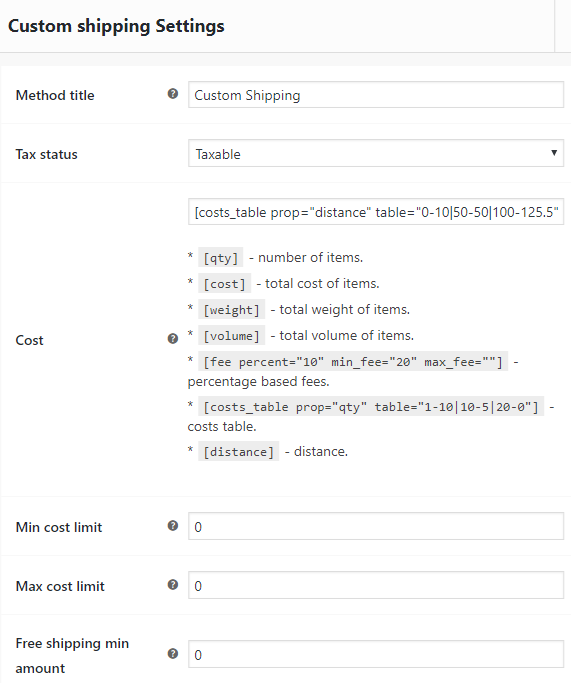
In addition to standard WooCommerce cost calculation shortcodes ([qty], [cost], [fee]) you can also use [weight] and [volume] shortcodes.
The plugin also includes:
- [costs_table] shortcode for the table rate shipping,
- [distance] shortcode for distance based cost calculation,
- options to set free shipping minimum order amount,
- options to set min and max cost limits,
- options to set custom shipping methods frontend icons and descriptions,
- min/max cost/weight/volume/quantity method availability options.
Costs Table
[costs_table] shortcode has two attributes: prop and table.
prop attribute can be: volume, weight, qty, cost or distance.
table attribute sets costs based on prop attribute’s value, in min_prop-cost format.
Costs Table by Items Volume
Items volume is calculated by multiplying each item’s width, height and length.
[costs_table prop="volume" table="0-10|50-50|100-125.5"]
This example will set costs according to this table:
| Volume | Shipping Cost |
|---|---|
| from 0 and below 50 | 10 |
| from 50 and below 100 | 50 |
| from 100 | 125.5 |
Costs Table by Items Weight
[costs_table prop="weight" table="0-10|50-50|100-125.5"]
This example will set costs according to this table:
| Weight | Shipping Cost |
|---|---|
| from 0 and below 50 | 10 |
| from 50 and below 100 | 50 |
| from 100 | 125.5 |
Costs Table by Items Quantity
[costs_table prop="qty" table="0-20|10-10|20-0"]
This example will set costs according to this table:
| Quantity | Shipping Cost |
|---|---|
| from 0 and below 10 | 20 |
| from 10 and below 20 | 10 |
| from 20 | free |
Costs Table by Order Amount
[costs_table prop="cost" table="0-20|10-10|20-0"]
This example will set costs according to this table:
| Order Amount (i.e. Order Cost) | Shipping Cost |
|---|---|
| from 0 and below 10 | 20 |
| from 10 and below 20 | 10 |
| from 20 | free |
Costs Table by Distance
Distance is calculated same as in [distance] shortcode. Also same attributes (key, default_distance, units, src, debug) are applied.
[costs_table prop="distance" table="0-10|50-50|100-125.5" key="BIzbSyBNBNR9yi3vTgC33oXSpwQftScNSmO-fjc" default_distance="100" units="km"]
* Please note that key from example is not a valid key – you need to get your own key here.
This example will set costs according to this table:
| Distance | Shipping Cost |
|---|---|
| from 0 and below 50 km | 10 |
| from 50 and below 100 km | 50 |
| from 100 km | 125.5 |
Distance based Cost Calculation
[distance] shortcode has five possible attributes:
- key – this is a required attribute. Plugin uses Google Distance Matrix API to calculate the distance, so you need to get your API key here. Please note that you need to check “Routes” when getting your key from Google.
- default_distance – this is a default distance for shipping (in case if customer didn’t enter his address yet or distance can’t be calculated). Default:
0. - units – units in which distance is calculated. Possible values:
mfor meters (default),kmfor kilometers andmifor miles. - src – source point (origin). By default it’s automatically retrieved from your shop’s settings from “WooCommerce > Settings > General > Store Address”. If you wish to set it manually – correct format is:
address, city postcode, country. - debug – if set to
yes, will output debug information in “WooCommerce > Status > Logs”. Default:no.
[distance] Example
1.5*[distance key="BIzbSyBNBNR9yi3vTgC33oXSpwQftScNSmO-fjc" default_distance="15" debug="yes" units="km"]
* Please note that key from example is not a valid key – you need to get your own key here.
Rounding
If you need to round some values, you can use
[round], shortcode, e.g.:
[round][weight]/100[/round]
[round] shortcode attributes:
- type – rounding type. Can be
up,downandnormal. Default isnormal. - precision – rounding precision. Used for
normalrounding type only. Sets the number of decimal digits to round to. Default is2. This is the same parameter as in PHPround()function:
If the precision is positive, the rounding will occur after the decimal point. If the precision is negative, the rounding will occur before the decimal point. If the absolute value of the precision is greater than or equal to the number of digits, the result of the rounding is equal to 0
Availability Options
For each custom shipping method you can optionally set min/max cost/weight/volume/quantity method availability options.

Shipping Class Costs Options
As in standard WooCommerce shipping methods, you can optionally set shipping class costs, i.e. costs that are based on the product shipping class.

General Options
General plugin options are located in “WooCommerce > Settings > Custom Shipping Methods”.

Admin Settings: Admin title
Sets custom shipping’s admin title. Visit “WooCommerce > Settings > Shipping” to set each method’s options.Default: Custom shippingFrontend Settings: Trigger checkout update
Will trigger the checkout update on any input change. This is useful if you are using cost calculation by distance to the customer.Default: noFrontend Settings: Add to zero cost
Will add text to custom shipping cost on frontend in case if it’s zero (i.e. free).Default: noFrontend Settings: Add to zero cost: Text
Text to add to zero cost. Ignored if “Add to zero cost” option above is disabled.Default: None
For example:
<span style="color:green;font-weight:bold;">Free!</span>
Icons & Descriptions: Enable section
Enables icons and descriptions options for custom shipping methods. Visit “WooCommerce > Settings > Shipping” to set each method’s icon and description.Default: noIcons & Descriptions: Icon templateSets template for the icons. Replaced value: %icon_url%.
Default:
<img style="display:inline;" src="%icon_url%">
Icons & Descriptions: Description templateSets template for the descriptions. Replaced value: %desc_text%.
Default:
<p style="font-size:small;font-style:italic;">%desc_text%</p>
Icons & Descriptions: Final template
Sets final template. Replaced values: %icon%, %label%, %desc%.
Default:
%icon%%label%%desc%