Show customers how close they are to free shipping
Display a clear progress message showing how much more customers need to spend — and
celebrate when they reach the threshold. Put the incentive wherever it matters in
your store.
Place the threshold message wherever your store needs it
Checkout Blocks Compatible
Works with WooCommerce Block Checkout
Threshold Progress
Show remaining spend
Dynamic Messaging
Update based on cart value
Free Shipping Goal
Make eligibility visible
Success State
Celebrate when the threshold is reached
From hidden rule to visible incentive
Don’t make customers guess how close they are to free shipping
Make the goal visible while customers are still deciding what to buy.
Problem
The free-shipping threshold is only discovered at checkout.
Solution
Show the goal earlier in the shopping journey.
Feature used
Flexible storefront placement
Problem
A customer is only a small amount away from the goal.
Solution
Show the exact remaining spend so the incentive is clear.
Feature used
Remaining amount
Problem
The cart value changes as products are added or removed.
Solution
Keep the threshold message aligned with the current cart value.
Feature used
Cart-value progress
Problem
The customer qualifies, but the message still looks unfinished.
Solution
Replace remaining spend with a clear success state.
Feature used
Threshold reached
Before / After
Make an invisible shipping rule part of the shopping experience
Without a visible threshold
Cart total$54.00
Shipping information appears later at checkout. The customer doesn’t know the
$75 free-shipping goal.
With Shipping Threshold Bar
Cart total$54.00
You’re $21.00 away from FREE SHIPPING
$54.00 / $75.0072% reached
Illustrative storefront comparison. Shipping eligibility remains controlled by your
store’s shipping rules.
A clearer shopping incentive
Make your free-shipping incentive impossible to miss
Cart value → progress → amount remaining → free shipping unlocked. Amounts and messages throughout this page are illustrative.
01
Tell customers exactly how much more they need to spend
A shipping goal becomes useful when customers can see the gap. At a $75 threshold, a $52 cart has $23 left to go — a concrete reason to consider another item.
The remaining amount stays readable without color
A clear goal beside the current cart value
Illustrative currency, not a product restriction
02
Put the shipping threshold where it can influence the buying decision
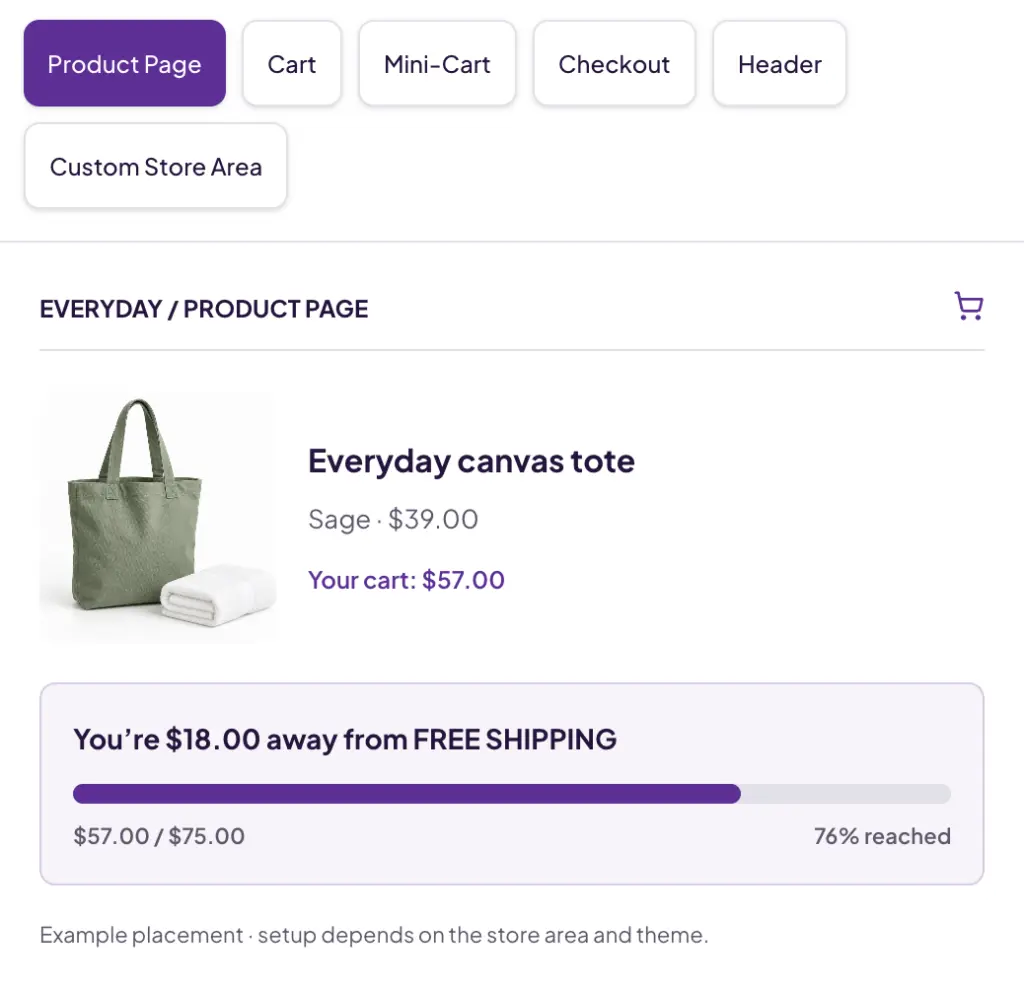
Whether customers are browsing, reviewing their bag or completing checkout, place the threshold bar where it best fits your store experience. The bar is not limited to a single fixed location.
Product pages, cart and mini-cart
Checkout, header and promotional areas
Custom theme locations; placement methods can differ
03
Make progress toward the threshold easy to understand
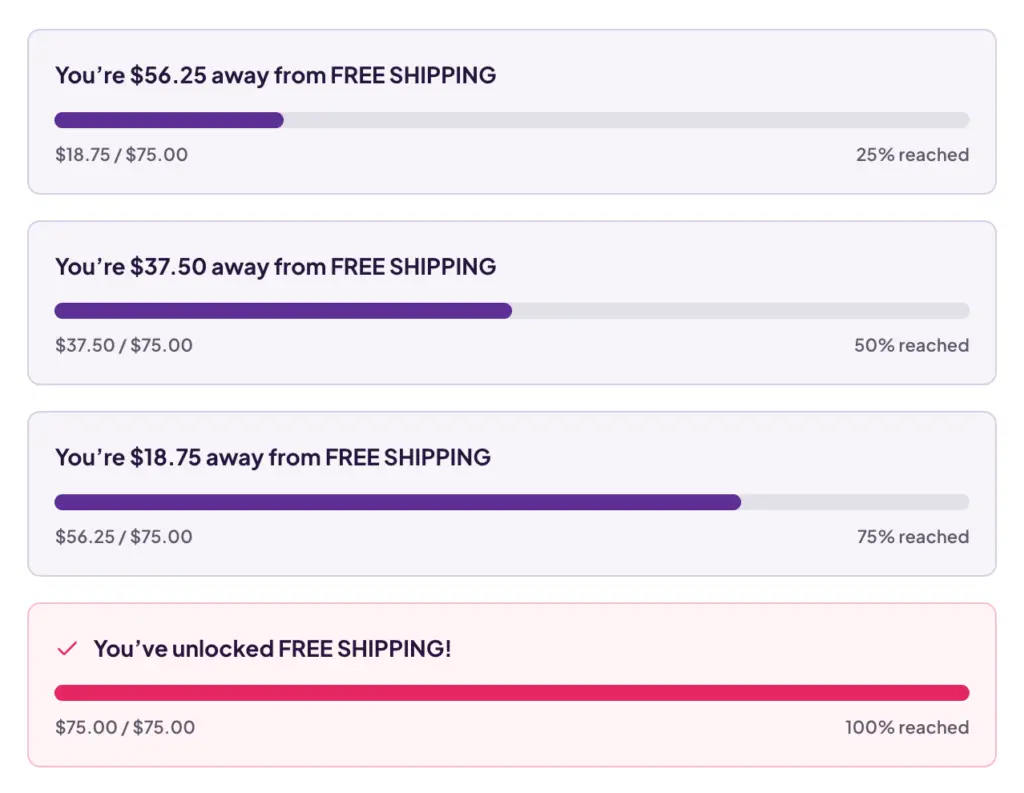
Pair a horizontal progress indicator with the remaining amount. Customers can see the goal coming closer without needing to interpret a shipping rule.
Progress toward a configured goal
25%, 50%, 75% and reached-state examples
Amounts and percentages communicate beyond color
04
Change the message when free shipping is unlocked
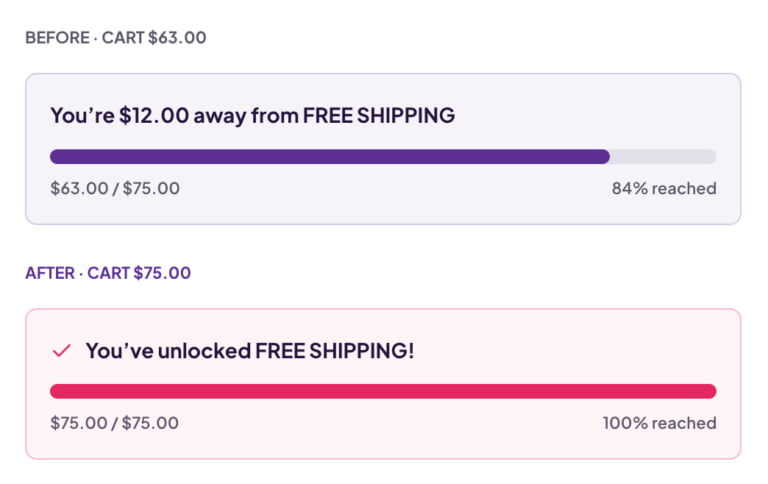
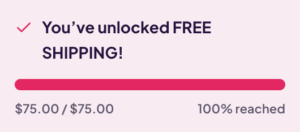
When the cart reaches the threshold, replace the remaining-amount message with a clear confirmation. The incentive has a beginning, progress and a satisfying conclusion.
Remaining spend before the goal
A clear confirmation once reached
Keep shipping eligibility visible
05
Keep the message aligned with the current cart
The threshold message reflects the customer’s current cart value. As the basket grows or shrinks, the amount remaining stays relevant to that basket.
Add a product → cart value changes
Remaining spend reflects the cart
AJAX refresh support for cart changes
Focused on the shopping journey
Automatic or manual threshold
Custom message tokens
AJAX cart refresh
Threshold-reached state
Product/category exclusions
Shortcode, block & Elementor
Colors and theme presets
Checkout Blocks support
How it works
From cart value to free-shipping progress
01
Set the threshold
Define the cart value required for your shipping incentive.
02
Choose where to display it
Place the bar where it makes sense in the customer journey.
03
Customer builds the cart
The progress message reflects the current cart value.
04
Threshold reached
Replace the remaining amount with a success state.
Message states
The right message at every stage of the cart
Illustrative message examples, not fixed plugin defaults. Configure your own
progress, almost-there and success messages.
01 / Empty / low cart
Free shipping available from $75
$0.00 / $75.000% reached
02 / In progress
You’re $32 away from free shipping
$43.00 / $75.0057% reached
03 / Almost there
Only $8 more for free shipping
$67.00 / $75.0089% reached
04 / Threshold reached
You’ve unlocked free shipping
$75.00 / $75.00100% reached
Configuration & design
Make the threshold bar feel like part of your store
Auto-detect your WooCommerce free-shipping threshold or set a manual campaign
goal. Customize the message and appearance to match the shopping experience.
Illustrative settings · not the plugin’s administration screen.
Use cases
A simple incentive for different WooCommerce stores
Give a nearly complete basket a clear next step
Encourage shoppers who are close to the threshold to consider another item.
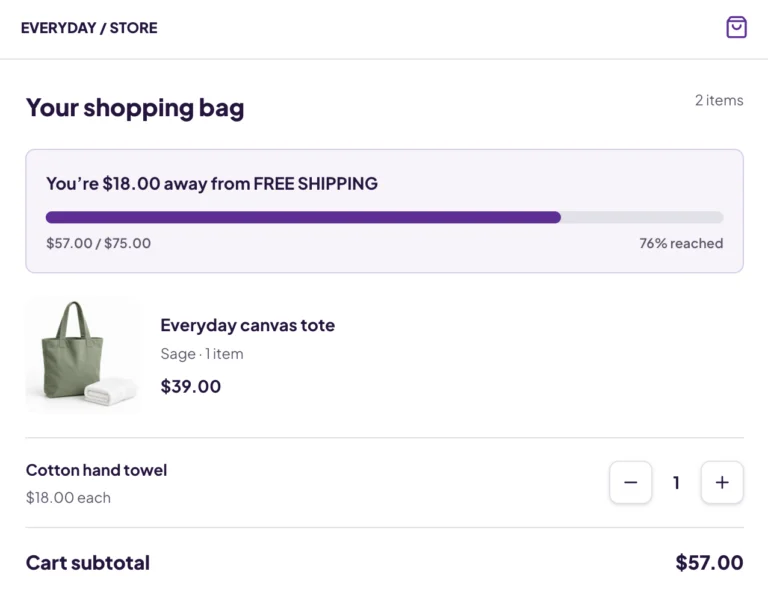
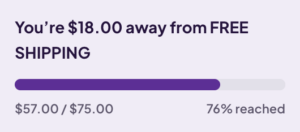
You’re $18.00 away from FREE SHIPPING
$57.00 / $75.0076% reached
1Shop a favorite item
2See the remaining spend
3Consider a complementary accessory
4Reach the free-shipping threshold
Compatibility
Built for modern WooCommerce storefronts
WooCommerce Checkout Blocks
Compatible
WooCommerce Cart Blocks
Compatible
HPOS
Compatible
WooCommerce
Compatible
Display locations
Flexible / configurable
WordPress tested version
See current product metadata
WooCommerce tested version
See current product metadata
PHP requirement
See current product metadata
Checkout Blocks, Cart Blocks and HPOS support are explicitly listed in the current WordPress.org description. Mini-Cart Blocks support is not separately claimed.
Pricing
Choose the license that fits your store
Annual licenses include updates and support for one year. Lifetime licenses are a one-time payment.
It shows cart progress toward a configured shipping threshold, the amount still needed and a success message when the threshold is reached.
How does the progress calculation work?
The current cart value is compared with the configured goal. For example, a $57 cart toward a $75 goal has $18 remaining. Values here are illustrative.
Can I choose the shipping threshold?
Yes. Auto-detect the free-shipping threshold from WooCommerce shipping methods or set a manual threshold for a campaign. Keep your shipping eligibility rules aligned with the goal.
Does the amount change when the cart changes?
Yes. AJAX refresh support keeps the bar aligned with cart changes.
What happens when the threshold is reached?
The remaining-amount message is replaced with a success state confirming that the shipping goal has been reached.
Where can the bar be displayed?
Across product pages, cart, mini-cart, checkout, header or promotional areas, and custom store locations. Setup can differ by location and theme.
Does it work with WooCommerce Checkout Blocks?
Yes. The plugin supports WooCommerce Block Checkout. The current product listing also confirms Cart Blocks support. Mini-Cart Blocks support is not separately claimed.
Can I show the message in more than one location?
Flexible placement lets you keep the incentive visible across the buying journey. Confirm the setup for your chosen combination of theme locations in the product documentation.
Does it work with WooCommerce free shipping?
It communicates progress toward a configured shipping incentive, such as free shipping. It is not a shipping-rate calculator; your shipping eligibility rules still determine the actual method available.
Does it guarantee larger baskets or higher conversion?
No. It makes the incentive clearer and can encourage customers to consider another useful product. Commercial outcomes depend on your store and customers.
Can I customize messages or appearance?
Yes. Customize progress, almost-there and success messages with tokens for remaining spend, percent, threshold and subtotal. Bar, track, text and background colors, sizing and theme presets are supported.
Does it work with different currencies?
Dollar amounts on this page are examples, not a currency requirement. Check the product documentation for your store currency and any multi-currency integration.
What support and updates are included?
Use the current product purchase page to confirm the site limit, license term, support, updates and renewal terms for your selected option.
What is the refund policy?
Check the current product purchase terms and Imaginate Solutions refund policy. No product-specific refund duration is claimed without confirmation.
WooCommerce manages orders. Your warehouse needs more.
WooCommerce handles ecommerce inventory well. Add the physical processes that connect a stock quantity to the work on your warehouse floor.
Problem
Stock quantities do not tell staff where to look.
Solution
Track stock by warehouse, bin and physical location.
Feature used
Problem
Picking starts by manually reading each order.
Solution
Turn WooCommerce orders into structured pick lists.
Feature used
Problem
Incoming vendor stock lives in spreadsheets.
Solution
Connect purchase orders with receiving into warehouse locations.
Feature used
Problem
Warehouse movements lose their context.
Solution
Record transfers between locations with a traceable reference.
Feature used
Problem
Packing and shipping status is hard to follow.
Solution
Move orders through defined pick → pack → ship stages.
Feature used
Problem
Stock adjustments lack enough history.
Solution
Keep quantities, reasons and references in an inventory trail.
Feature used
The connected warehouse workflow
One workflow from purchasing stock to shipping the order
01 / 06
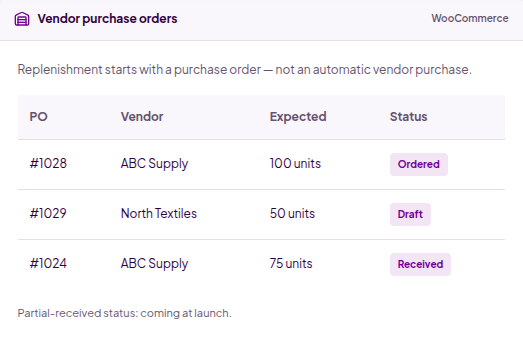
Create a vendor purchase order
Record the vendor, products and expected quantities. Keep replenishment connected to the warehouse.
Illustrative workflow · No stock or orders are changed
Vendor purchase orders
WooCommerce
Replenishment starts with a purchase order — not an automatic vendor purchase.
PO
Vendor
Expected
Status
#1028
ABC Supply
100 units
Ordered
#1029
North Textiles
50 units
Draft
#1024
ABC Supply
75 units
Received
Partial-received status: coming at launch.
Built for the warehouse floor
Control the stock. Connect the work.
Practical operational screens for physical inventory, replenishment and fulfilment. All examples use fictional warehouse data.
01
Know what you have — and where it is
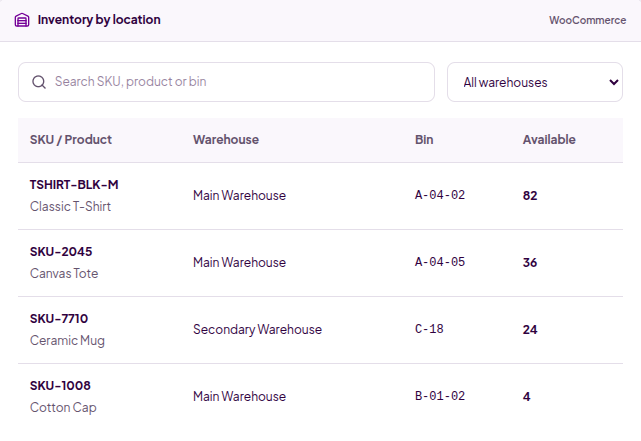
See products and SKUs across warehouses and bins. Find available stock without asking someone who happens to know the shelves.
Search by product, SKU or bin
Filter inventory by warehouse
View stock availability by location
02
Organize stock around your real warehouse layout
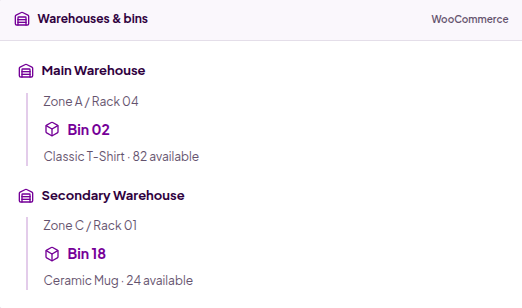
Give products a clear physical home. Use a practical warehouse → zone / rack → bin hierarchy, not a complicated graphical floor plan.
Multiple warehouses and stock locations
Bins that reflect your physical shelves
Consistent location references for warehouse staff
03
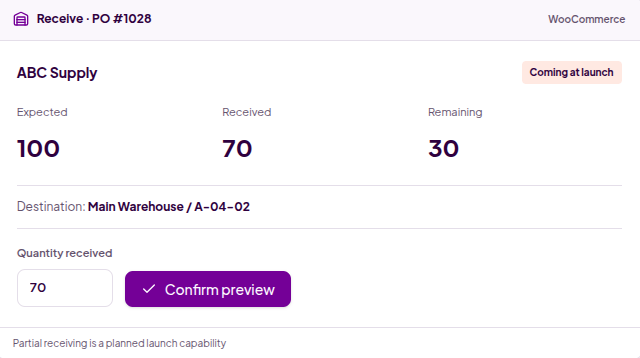
Receive incoming stock against purchase orders
Connect vendor deliveries to expected quantities and the right warehouse destination. The launch preview shows how a partial receipt could keep the remaining balance visible.
Choose destination warehouse and bin
Confirm quantities against a purchase order
Partial receiving: coming at launch
04
Manage replenishment before stock runs out
Keep vendor records, purchase-order items and incoming deliveries in one workflow. Create orders deliberately; no automated vendor ordering is implied.
Vendor records and expected quantities
Draft → Ordered → Received status
Partial-received status: coming at launch
05
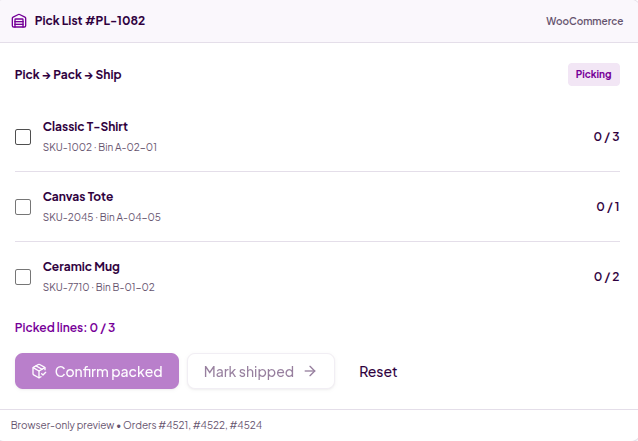
Turn WooCommerce orders into efficient pick workflows
Give warehouse staff a list of products, SKUs, bins and required quantities. Confirm each line, then move the picked items into packing.
Pick lists connected to WooCommerce orders
Required and picked quantities side by side
Confirm picked items before packing
06
Confirm every item before the order leaves
Move the order from picked to packed to shipped. Warehouse fulfilment remains connected to WooCommerce without becoming a separate carrier platform.
Confirm items at the packing stage
Track Ready to Ship and Shipped status
No carrier labels or box optimization claims
07
Move inventory with a clear record
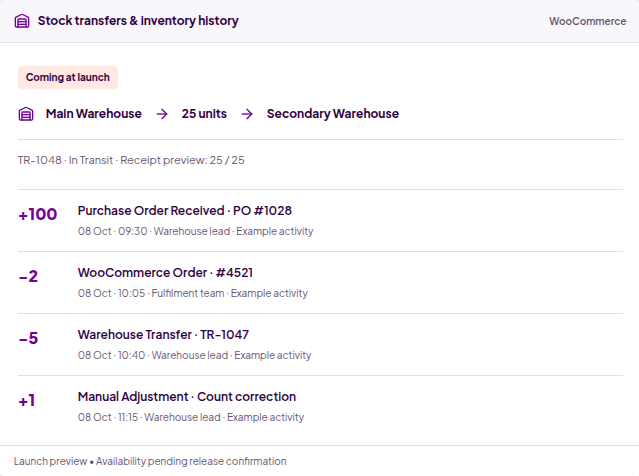
The launch preview connects warehouse transfers with inventory history, so movements are never just silent changes to a stock total.
Transfer references and receipt quantities
Adjustments with a reason, time and reference
Transfers and inventory history: coming at launch
Coming at launch / planned
More operational control, as the product grows
The following capabilities are being developed. They are not presented as already released.
Planned capability
Move faster with scan-based workflows
Scan a bin, scan a product and confirm the quantity. Browser/device-friendly barcode and QR workflows are planned, with hardware support to be confirmed.
Scan-based workflow
WooCommerce
Coming at launch
TSHIRT-BLK-M
Scan Bin
Scan Product
Confirm Quantity
Planned • Device and scanner support pending testing
Planned capability
See stock risk before it becomes a problem
Low-stock thresholds, reorder indicators and purchase-order prompts are planned. Replenishment decisions stay with your team — no automated vendor purchases.
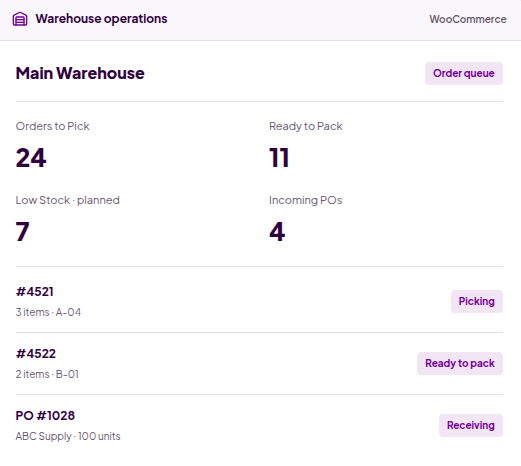
Warehouse operations
WooCommerce
Main Warehouse
Order queue
Orders to Pick
24
Ready to Pack
11
Low Stock · planned
7
Incoming POs
4
#4521
3 items · A-04
Picking
#4522
2 items · B-01
Ready to pack
PO #1028
ABC Supply · 100 units
Receiving
Illustrative operational preview
Planned capability
Give warehouse teams clear ownership
Lightweight pick-list and receiving-task assignment is planned. Keep ownership and task status clear without a complex workforce-management system.
Warehouse task ownership
WooCommerce
Planned
Pick List #PL-1082
Warehouse team A
Picking
Receive PO #1028
Warehouse team B
Waiting
An operational dashboard — not vanity charts
Orders to pick, orders to pack, incoming shipments and open transfers help focus attention on work. Advanced operational reporting is planned.
Use cases
Built for WooCommerce businesses managing physical stock
A clear path from order to dispatch
For stores fulfilling WooCommerce orders from their own warehouse, with stock organized where the team actually works.
Capabilities used
Bins
Picking
Packing
Inventory
1Receive inventory into a bin
2Create a pick list from WooCommerce orders
3Confirm each SKU and quantity
4Pack and update fulfilment status
Keep repeat SKU-based orders organized
Connect larger-quantity orders with replenishment, warehouse stock and practical pick lists.
Capabilities used
Vendors
Purchase orders
Pick lists
Transfers · planned
1Record vendor purchase orders
2Receive products into locations
3Pick quantities for repeat orders
4Track location movements · launch capability
See stock across more than one location
Give each warehouse its own stock view while keeping inventory connected to your WooCommerce store.
Capabilities used
Multi-warehouse
Stock by location
Transfers · planned
1Define warehouses and bins
2Find available stock by location
3Create controlled transfers · coming at launch
4Review movement history · coming at launch
Manage purchased goods and warehouse inventory
For manufacturers tracking stored products and purchased components. This is not manufacturing planning, MRP or a full ERP.
Capabilities used
Vendors
Receiving
Bins
Inventory
1Maintain vendor records
2Create purchase orders for incoming goods
3Receive products into warehouse locations
4Track inventory and fulfil WooCommerce orders
Give the team a shared operational workflow
Keep picking, packing and shipping status clear for warehouse staff. Lightweight task assignment is planned, not a workforce-management suite.
Capabilities used
Pick & pack
Order queue
Task assignment · planned
1Review the order queue
2Work through a structured pick list
3Confirm packed items
4Update shipping status
Built on WooCommerce
Go beyond WooCommerce’s basic stock quantity
WooCommerce remains your ecommerce foundation. Warehouse Management adds location-based stock and structured operational processes.
WooCommerce Core
Stock quantity
Product inventory status
Ecommerce order management
Warehouse Management
Multiple warehouses
Bins and locations
Stock by location
Receiving
Vendor records
Purchase orders
Pick lists
Packing workflow
Transfers · coming at launch
History · coming at launch
Operational warehouse queue
Warehouse management without leaving your WooCommerce workflow
For businesses that have outgrown basic stock management but do not need the complexity of a large external ERP. Keep products, inventory and orders connected in a familiar WordPress environment — without disconnected spreadsheets or a separate operational platform for core workflows.
Compatibility
Built for modern WooCommerce operations
WooCommerce
Compatible — specified product support
HPOS
Compatible — specified product support
WordPress
Tested version pending release
PHP
Requirement pending release
WooCommerce and HPOS support are specified in the product brief. Final release testing must confirm these before publication. WPML, multi-currency and Subscriptions compatibility are not claimed.
Pro-only pricing
Choose your warehouse license
One Pro product. Choose your site limit and the license term that fits your business.
The standard Imaginate Solutions policy offers a 30-day money-back guarantee. Applicability to this new product will be confirmed before checkout opens.
FAQ
Warehouse Management questions, answered
What is Warehouse Management for WooCommerce?
A Pro-only warehouse operations product built around WooCommerce inventory and orders, connecting warehouses, bins, receiving, purchase orders and pick-pack-ship activity.
How is it different from WooCommerce stock management?
WooCommerce manages product stock quantities and ecommerce orders. This product adds physical stock locations and structured warehouse operations around those products and orders.
Can I manage multiple warehouses?
Yes. Multi-warehouse inventory and location-based organization are part of the specified core product scope.
Can inventory be tracked by bin or location?
Yes. The warehouse hierarchy connects physical bins and locations with products and SKUs, helping staff find the right stock.
Can I create vendor purchase orders?
Vendor records, purchase-order items, expected quantities and PO status form the replenishment workflow. Automated vendor purchasing is not claimed.
Can I receive stock against purchase orders?
Receiving connects expected quantities with a destination warehouse and bin. The preview illustrates receipt confirmation without changing real stock.
Does it support partial receiving?
Partial receiving is shown as a coming-at-launch capability. Availability must be confirmed in the release before relying on this workflow.
Can I create pick lists from WooCommerce orders?
Order-connected pick lists are part of the product scope, showing products, SKUs, bins, required quantities and picking confirmation.
Can staff mark products as picked?
The picking workflow includes confirming picked quantities. Try the fictional pick list on this page to see the operational concept.
Is there a packing workflow?
Yes. The specified workflow moves picked items into packed and ready-to-ship stages, with warehouse status connected to the WooCommerce order.
Can inventory be transferred between warehouses?
Controlled stock transfers with references and receiving status are coming at launch. The example illustrates the intended workflow, not a release guarantee.
Can stock adjustments be tracked?
Reasoned adjustments and an inventory movement trail are shown as coming-at-launch capabilities. Final availability depends on the released version.
Is there an inventory audit or history log?
Inventory history is planned for launch, with quantity, reason, date/time, user where relevant and a reference. It is not presented as already released.
Does it support barcode scanning?
Barcode and QR workflows are planned. Specific devices, scanner hardware and browser support will be confirmed through testing.
Can I see low-stock products?
Low-stock thresholds, reorder indicators and purchase-order prompts are planned. No automated purchasing or replenishment is implied.
Can warehouse tasks be assigned to employees?
Lightweight warehouse-task ownership is planned. It is not a workforce-management or staffing system.
Is WooCommerce HPOS supported?
HPOS compatibility is specified in the product brief. Final release testing and compatibility details must be confirmed before publication.
Does it replace WooCommerce inventory?
No. It builds warehouse-operational processes around your WooCommerce products, inventory and orders.
Is an external ERP required?
The core warehouse workflow is intended to run in your WordPress/WooCommerce environment. It does not claim to replace every ERP, external WMS or manufacturing platform.
What support is included?
The proposed annual license includes one year of support and updates; lifetime licensing includes lifetime support and updates. Final support, renewal and billing terms must be confirmed when checkout opens.
What is the refund policy?
Imaginate Solutions has a standard 30-day money-back policy. Its applicability to Warehouse Management will be confirmed before purchases open.
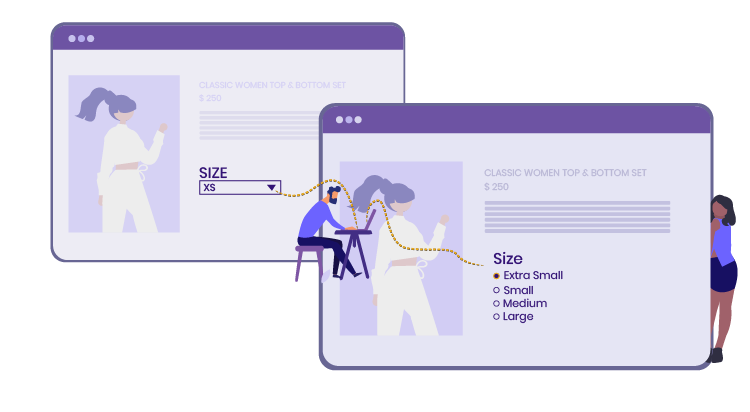
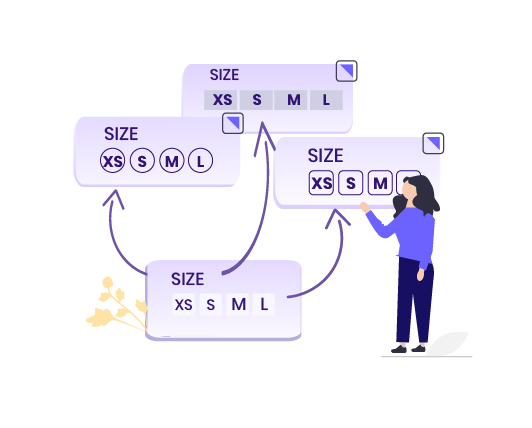
Replace variation dropdowns with visible radio-button options. Show more choices
at once and let customers select variations directly from product, Shop and
Archive pages.
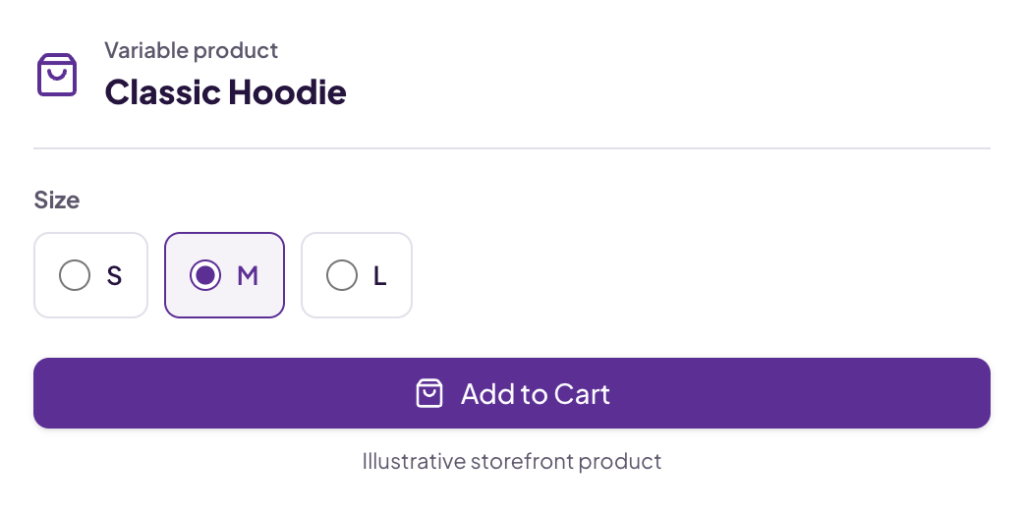
Dropdowns → Visible choices → Add to CartStorefront preview
Variable product
Classic T-Shirt
Illustrative storefront product
Radio Button Variations
Replace standard dropdowns
Shop Page Selection
Choose while browsing
Flexible Attribute Display
Separate or merged options
Custom Styling
Templates, HTML and CSS
Subscriptions Compatible
Variable subscription products
WPML & Polylang
Multilingual compatibility
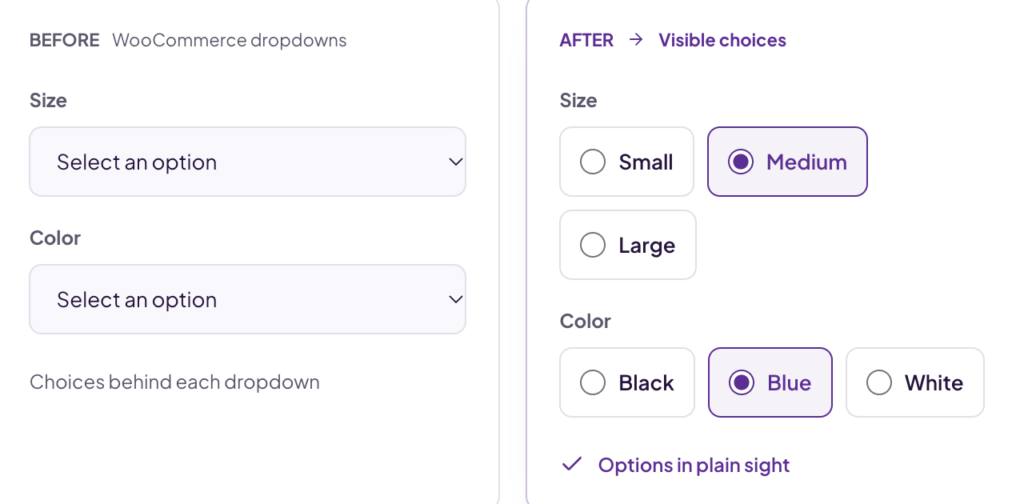
Hidden options → visible choices
Make variation selection easier than opening one dropdown after another
Keep the WooCommerce product workflow. Give shoppers a clearer way to make their choices.
Problem
Options are hidden behind several dropdowns.
Solution
Show attributes as visible radio-button choices.
Feature used
Dropdown-to-radio conversion
Problem
Every product needs another page visit.
Solution
Select variations directly from Shop and Archive pages.
Feature used
Shop-page selection
Problem
Complete combinations are hard to compare.
Solution
Present manageable sets of combinations together.
Feature used
Merged display
Problem
Customers need to choose one attribute at a time.
Solution
Keep size, color and other attributes independent.
Feature used
Separate display
Problem
Standard controls do not match your store.
Solution
Adjust the presentation with templates, HTML and CSS.
Feature used
Custom presentation
Product features
Make variable products easier to understand and select
Radio-button presentation for the places your customers already shop.
01
Show product choices instead of hiding them inside dropdowns
Replace standard WooCommerce variation selectors with radio buttons so shoppers can see and compare available options directly.
Visible attribute choices
Familiar radio-button selection
Keep your existing WooCommerce variations
02
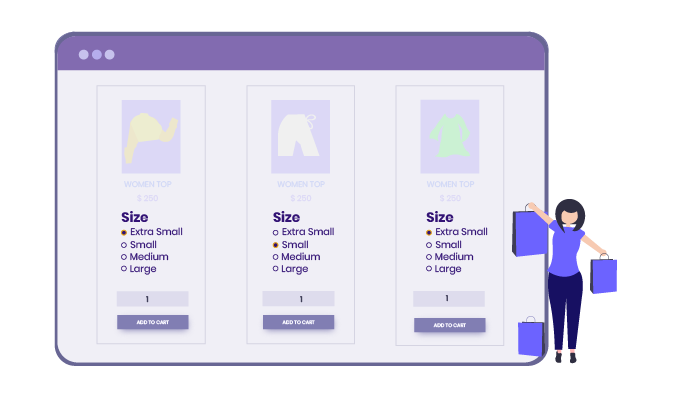
Let customers choose before opening the product page
Display variable product options directly on WooCommerce Shop and Archive pages, bringing selection closer to browsing.
Shop and product-category pages
Choose a variation before Add to Cart
Fewer navigation steps
03
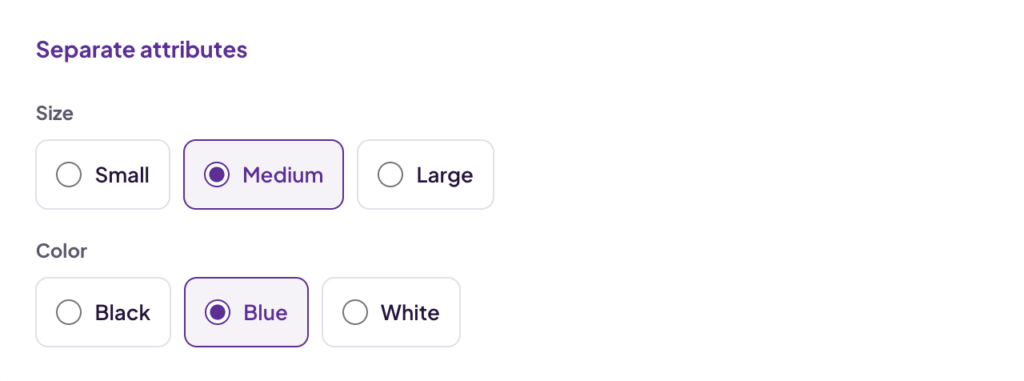
Keep each product attribute easy to scan
Show attributes separately when customers should make one choice at a time. Size, color or material stay in their own groups.
Independent attribute groups
ProClear labels for each choiceduct and category restrictions
04
Show complete variation combinations in one view
Present combinations together when the set is small enough to compare comfortably. Choose the display that suits your products.
Complete combinations in one list
Best for a manageable number of options
05
Fit variation controls into your store design
Use available display templates, custom HTML in the variations table and custom CSS to adjust the presentation.
Multiple template options
Custom HTML and CSS support
No visual builder required
Shop & Archive pages
Choose the variation while browsing the Shop
Customers can select what they want directly on Shop and Archive pages instead of opening each product first.
Variable product
Classic Hoodie
Illustrative storefront product
Variable product
Premium T-Shirt
Illustrative storefront product
Variable product
Coffee Box
Illustrative storefront product
Display options
Choose how your variation options are presented
Use independent attributes or complete combinations. The right choice depends on your products and the number of available options.
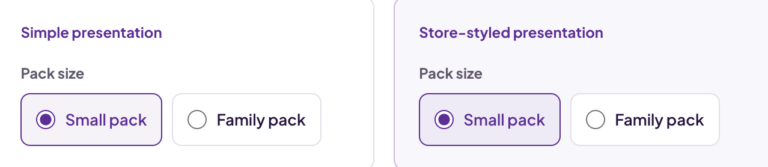
Separate attributes
For shoppers who should select each attribute independently.
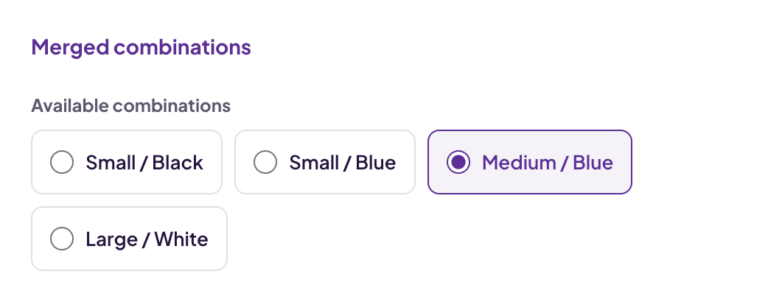
Merged combinations
For a manageable set of complete combinations that is easy to compare.
Inside the product
Original product visuals
Dropdown-to-radio variation presentation · Original product visual
Shop-page variation selection · Original product visual
Product display and template options · Original product visual
More of the essentials, built in
Product-page radio controls
Shop-page selection
Archive-page support
Separate attributes
Merged combinations
Display templates
Custom HTML
Custom CSS
Translation-ready
Variable subscriptions
WPML compatibility
Polylang compatibility
Performance-focused code
How it works
From variable product to clearer product choices
01
Keep your variable product
Create products and variations using WooCommerce as usual.
02
Choose your display
Select radio-button presentation and the desired display style.
03
Make options visible
Customers see their choices without opening dropdowns.
04
Select and add to cart
The selected variation follows the normal WooCommerce cart workflow.
WooCommerce VariationsRadio Button DisplayCustomer SelectionAdd to Cart
Use cases
A clearer variation experience for different product types
Size, color and fit in plain sight
Help shoppers compare product choices without opening several dropdowns.
1Browse a variable product
2Select size, color and fit
3Add the chosen variation to cart
Compatibility
Works with popular WooCommerce product workflows
WooCommerce
Compatible
WooCommerce Subscriptions
Variable Subscription products
WPML
Compatible
Polylang
Compatible
Translation ready
Supported
Test your theme and product configuration before going live. Current tested-version details are linked in technical information below.
Customer stories
A clearer product experience. Support that follows through.
“Not only a very useful and quality product, but the Support I got was far and away better than I’ve ever experienced with any other plug-in product.”
Brian WaltonFounder & Marketing Director, e-Marketing GuruShortened product-page review excerpt
“The plugin had incompatibility issues with another plugin, the support has reacted lightning fast, Dhruvin has debugged the plugin on the same day, now everything´s working perfectly.”
Attila Jaki,
Founder, Musamax Shortened product-page review excerpt
Pricing
Choose the license that fits your store
The same product-selection tools, for one store or your whole portfolio. Prices in USD.
Your purchase is protected by a 30-day money-back guarantee according to the refund policy.
FAQ
Your variation-selection questions, answered
What does Variations Radio Buttons for WooCommerce do?
It replaces standard WooCommerce variation dropdowns with radio-button-style choices and offers flexible attribute display.
Does it replace WooCommerce variation dropdowns?
Yes. It changes how variation choices are presented, not how the underlying WooCommerce variations are created.
Can radio buttons appear on WooCommerce Shop pages?
Yes. Customers can select variable product options directly on Shop pages.
Does it work on product-category and Archive pages?
Yes. The plugin supports variation selection on WooCommerce Archive pages.
Can I display attributes separately?
Yes. Attributes can be shown as independent groups so customers select each one separately.
Can I show complete variation combinations?
Yes. Merged display presents complete combinations in one view. This is most useful for a manageable number of choices.
Can I customize the appearance?
Yes. Use available display templates and custom HTML or CSS to adjust the presentation.
Can I add custom CSS?
Yes. Custom CSS is supported for store-specific styling.
Can I add custom HTML?
Yes. Custom HTML is supported in the variations table.
Does it work with WooCommerce Subscriptions?
Yes. The plugin supports Variable Subscription products.
Is it compatible with WPML?
Yes. WPML compatibility is listed for this product.
Is it compatible with Polylang?
Yes. Polylang compatibility is listed for this product.
Does it change how WooCommerce variations are created?
No. Continue creating attributes and variations in WooCommerce. The plugin changes their storefront presentation.
What support is included?
Annual licenses include one year of support and updates. Lifetime licenses include lifetime support and updates. Confirm annual renewal terms on the purchase page.
What is the refund policy?
Purchases are covered by a 30-day money-back guarantee according to the published refund policy.
Current version, update, tested-version and PHP details require confirmation with product support. The original page currently links documentation and changelog for a different plugin; request product-specific references before relying on those links.
Related plugins
More WooCommerce tools from Imaginate Solutions
File Uploads Addon for WooCommerce
Collect customer artwork and documents on product pages.
Show or hide payment methods based on the customer's user role.
Control WooCommerce payment gateways by customer role
Choose which payment methods each WordPress or WooCommerce user role can use at checkout — including default and custom roles, and standard or custom payment gateways.
Not every customer should see the same payment methods
Match your checkout to the customer, without replacing your existing payment setup.
Problem
Wholesale payment options appear to retail customers.
Solution
Allow invoice and bank transfer only for the wholesale role.
Feature used
Role-based gateway rules
Problem
Public customers can see staff-only Cash on Delivery.
Solution
Restrict COD to administrator or staff roles.
Feature used
Guest and staff workflows
Problem
Your membership plugin creates custom customer roles.
Solution
Use those WordPress roles directly in your gateway rules.
Feature used
Custom role support
Problem
Your store uses a custom payment gateway.
Solution
Control its availability alongside standard WooCommerce methods.
Feature used
Custom gateway support
Problem
A customer has more than one assigned role.
Solution
Choose whether only the first role or all roles are considered.
Feature used
Multiple-role evaluation
Payment control
Control payment options without changing your gateway setup
This plugin controls access to existing payment methods. It does not create new gateways or process payments.
01
Choose which roles can use each payment method
Configure gateway availability using role-based allow and restrict rules. Keep account-based methods for wholesale customers and online methods for public checkout.
Allow payment gateways by role
Restrict payment gateways by role
Support guest and logged-in checkout
02
Works with the payment gateways your store already uses
Control payment methods registered with WooCommerce, rather than choosing from a fixed list of supported methods.
Standard WooCommerce payment gateways
Custom payment gateways
Gateways added by WooCommerce extensions
03
Use any WordPress role in your checkout rules
Use default WordPress roles, WooCommerce customer and shop roles, or custom roles created by other WordPress plugins.
Default WordPress and WooCommerce roles
Membership and wholesale role workflows
Custom roles already on your site
04
Decide how users with multiple roles are evaluated
Choose whether the plugin considers only the first role or all assigned roles when evaluating your gateway rules.
First role only
All assigned roles
Test combined role rules for your store
Focused checkout capabilities
Allow gateways by role
Restrict gateways by role
Standard WordPress roles
Custom WordPress roles
Standard WooCommerce gateways
Custom payment gateways
Multiple-role evaluation
Guest checkout workflows
Wholesale payment workflows
Staff-only payment methods
How it works
From user role to checkout payment options
01
Choose a user role
Select the WordPress or WooCommerce role you want to control.
02
Choose payment gateways
Allow or restrict existing gateways for that role.
03
Set role evaluation
Choose first-role or all-role evaluation when needed.
04
Match the checkout
Customers see the payment methods allowed by your rules.
User RoleGateway RulesWooCommerce Checkout
Use cases
Useful wherever customer types need different payment options
Account-based payments for wholesale customers
Keep invoice and bank-transfer methods for wholesale roles while retail customers pay online.
Capabilities used
Role-based gateway visibility
1Wholesale customer signs in
2Gateway rules evaluate the assigned role
3Checkout shows bank transfer or invoice
Internal payment methods stay internal
Allow administrator or staff roles to use COD without exposing it to public customers.
Capabilities used
Staff-only gateway access
1Staff user signs in
2Staff role is evaluated
3COD is available only to permitted roles
Payment choices for members and VIP customers
Use existing member or VIP roles to make selected methods available to those customer groups.
Capabilities used
Custom WordPress roles
1Customer has a membership role
2Custom role is matched to gateway rules
3Checkout shows permitted methods
A focused payment set for guest customers
Guests can see a selected set of online methods while registered customers receive additional options.
Capabilities used
Guest and logged-in workflows
1Customer arrives at checkout
2Guest or logged-in status is evaluated
3Relevant payment options are shown
Checkout rules for your business-specific roles
Use roles created by wholesale, membership or other WordPress plugins without rebuilding your payment setup.
Capabilities used
Third-party role support
1An existing plugin assigns a custom role
2Configure allowed and restricted gateways
3Customer sees the matching payment set
Before → after
Simplify checkout by showing only relevant payment methods
Fewer irrelevant choices. Payment options that match the customer type.
Before · Every customer
All customers
Order total$120.00
Payment method
Credit Card
PayPal
Bank Transfer
Invoice
Cash on Delivery
Checkout example · no transaction
After · Retail customer
Retail Customer
Order total$120.00
Payment method
Credit Card
PayPal
Checkout example · no transaction
After · Wholesale customer
Wholesale Customer
Order total$120.00
Payment method
Bank Transfer
Invoice
Checkout example · no transaction
Gateway support
Works with standard and custom WooCommerce payment gateways
The plugin controls payment methods registered with WooCommerce. It is not a payment processor and is not limited to a fixed list of gateways.
The current product page lists tested examples including Stripe, PayPal Pro, Authorize.net, Mercado Pago, Braintree and Square. These names do not imply certification or partnership.
REGISTERED WITH WOOCOMMERCE
Standard gateways
Stripe
PayPal Pro
Authorize.net
Mercado Pago
Braintree
Square
Custom gateways
Compatibility examples, not partnerships or certifications. Test your installed gateway configuration.
Default / WooCommerce roles
Administrator
Editor
Customer
Shop Manager
Custom role examples
Wholesale Customer
Dealer
VIP Customer
Member
Custom role names are illustrative. Guest is a checkout state, not a stored WordPress role.
User role support
Works with the roles already on your WordPress site
Use default WordPress and WooCommerce roles or custom roles created by other WordPress plugins.
Wholesale Customer, Dealer, VIP Customer and Member are illustrative custom roles. The role names available on your store depend on its configuration.
Customer stories
Real checkout requirements. A focused solution.
“All I needed was some way to make sure logged in users (just our admin staff) could take COD payments while Guest users (the general public) could only use credit cards for online payments. This plugin does that very simply, it’s working perfectly, and I couldn’t be happier!”
WebbyFounder, The Tangled WebbyStaff COD / public online payments · Shortened excerpt
“Great plugins, does exactly what it says and more.. Outstanding support, quick and resourceful : ) Thanks to Dhruvin and his team!”
Georges Langeard,
Founder, Agence.Guru Product-page review excerpt
Original product reviews: https://imaginate-solutions.com/downloads/payment-gateways-by-user-roles-for-woocommerce/
Pricing
Choose the license that fits your store
Annual or lifetime access, for one site or your full store portfolio. Prices in USD.
30-day money-back guarantee. If the plugin does not meet your requirements, request a full refund within
30 days of the original purchase, according to the refund policy.
FAQ
Questions about role-based payment control
What does Payment Gateways by User Roles do?
It controls which existing WooCommerce payment gateways are available to customers based on their user roles.
Can I control any WooCommerce payment gateway?
The plugin supports standard and custom payment gateways registered with WooCommerce. Test your installed gateway configuration before deploying rules.
Does it work with custom payment gateways?
Yes. It can control custom WooCommerce gateways as well as standard gateways.
Does it support Stripe and PayPal?
The product page lists tested gateway examples including Stripe and PayPal Pro, alongside Authorize.net, Mercado Pago, Braintree and Square. These are not partnerships or certifications.
Can I use roles created by other plugins?
Yes. Custom WordPress roles created by membership, wholesale or other plugins are supported.
Does it support custom WordPress roles?
Yes, alongside default WordPress and WooCommerce roles.
Can wholesale and retail customers see different gateways?
Yes. Configure gateway availability by role, for example invoice for wholesale customers and online card payments for retail customers.
Can I restrict Cash on Delivery to store staff?
Yes. Use administrator or staff roles to control access to an existing COD gateway and exclude public customers.
What happens if a user has multiple roles?
The plugin provides first-role-only or all-role evaluation. Test your combined role rules; no unverified allow/deny conflict precedence is implied here.
Can I choose whether the first role or all roles are evaluated?
Yes. Select the role-evaluation behavior that matches your store requirements.
Does the plugin create new payment gateways?
No. It controls existing gateways. Custom Payment Gateways for WooCommerce is the separate plugin for creating custom/manual payment methods.
What support is included?
Annual licenses include one year of updates and support. Lifetime licenses include lifetime updates and support. Confirm current purchase and renewal terms on the original purchase page.
What is the refund policy?
A full refund can be requested within 30 days of the original purchase, according to the refund policy.
Your deliveries, your pricing: customize WooCommerce shipping around your business
Create custom WooCommerce shipping methods using distance, weight, quantity, cart value, volume and product-based rules — ideal for stores managing their own delivery costs.
Shipping costs should follow your business rules — not someone else’s
When you fulfil orders yourself, your shipping calculation should reflect your own delivery process.
Problem
You deliver using your own vehicles or local delivery network.
Solution
Calculate shipping using customer distance instead of external carrier pricing.
Feature used
Distance-based rules
Problem
Heavy orders cost more to deliver.
Solution
Set charges using minimum/maximum weight and weight ranges.
Feature used
Weight-based shipping
Problem
Some products need different shipping rules.
Solution
Include or exclude methods using products, categories or tags.
Feature used
Product conditions
Problem
Certain product types need extra delivery charges.
Solution
Apply additional charges using WooCommerce shipping classes.
Feature used
Shipping-class charges
Problem
Pricing changes at different distances or weights.
Solution
Define table-rate style ranges and thresholds.
Feature used
Range-based pricing
Problem
Some carts should qualify for free delivery.
Solution
Configure free-shipping conditions around your own rules.
Feature used
Free-shipping conditions
Distance-based delivery
Build your own distance-based delivery pricing
If your business handles delivery directly, calculate shipping based on how far the customer is from your configured origin. Define your own distance ranges and prices.
Distance is calculated using Google Distance Matrix API.
Google API usage and any applicable API charges are separate from the plugin license.
Build shipping calculations around how you actually fulfil orders
Choose how the rate is calculated, then apply the conditions and limits that fit your store.
01
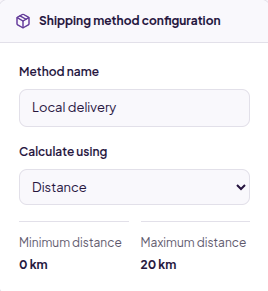
Charge shipping based on how far the customer is from you
Use the customer’s delivery address and your configured origin to calculate distance through Google Distance Matrix API. Define the distance ranges, limits and fees your delivery operation uses.
Configured origin / store location
Minimum and maximum distance
Your own distance pricing ranges
02
Let heavier orders carry the right shipping cost
Calculate rates from total cart weight. Use structured ranges so charges change predictably as order weight increases.
Minimum and maximum weight
Weight-based ranges
Rates set by your business
03
Show or hide shipping methods based on what’s in the cart
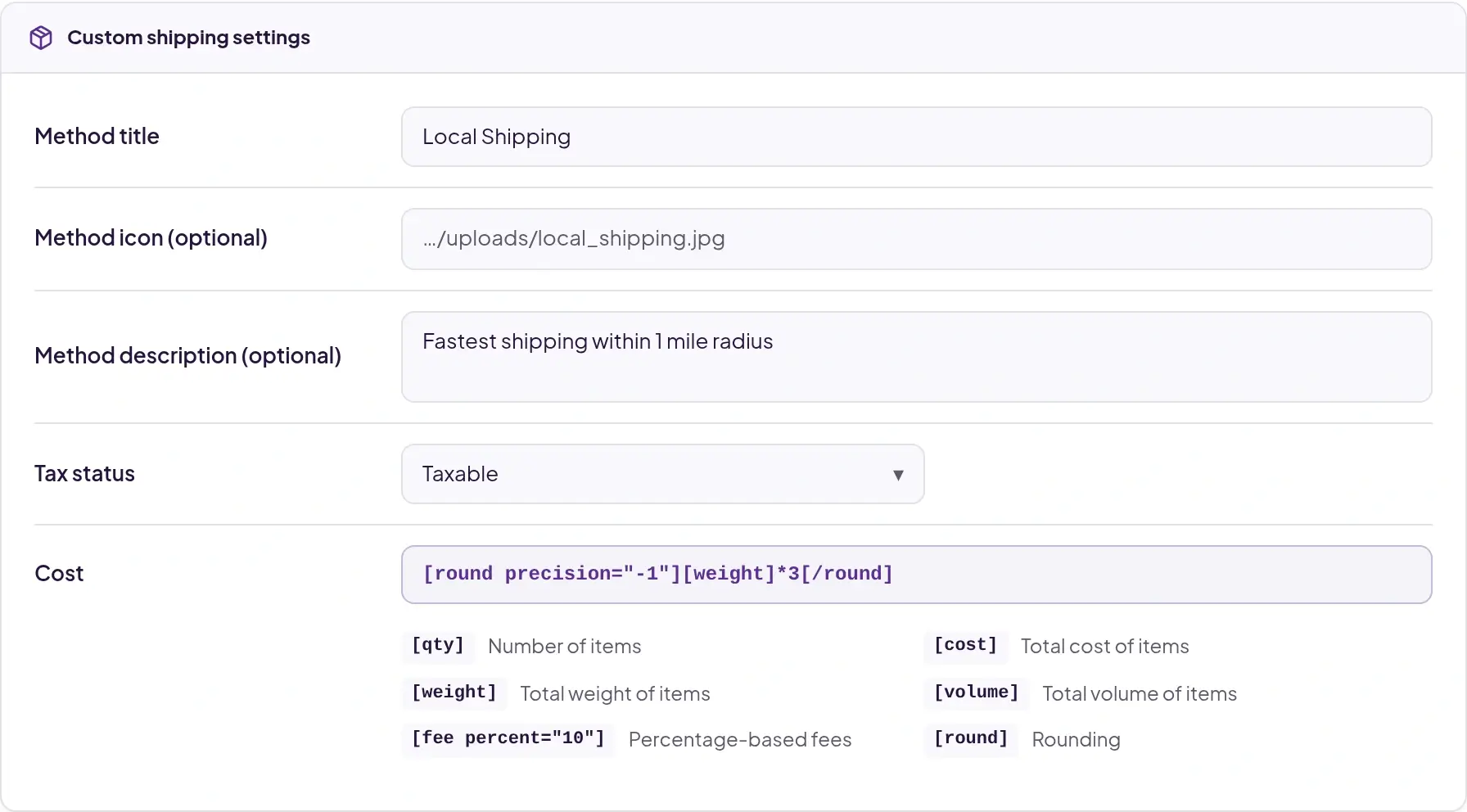
Control availability using individual products, categories and tags. Create appropriate options for oversized, fragile or local-only products. The original settings below show cost limits and free-shipping product controls.
Include or exclude products
Product-category conditions
Product-tag conditions
04
Add delivery charges for special product types
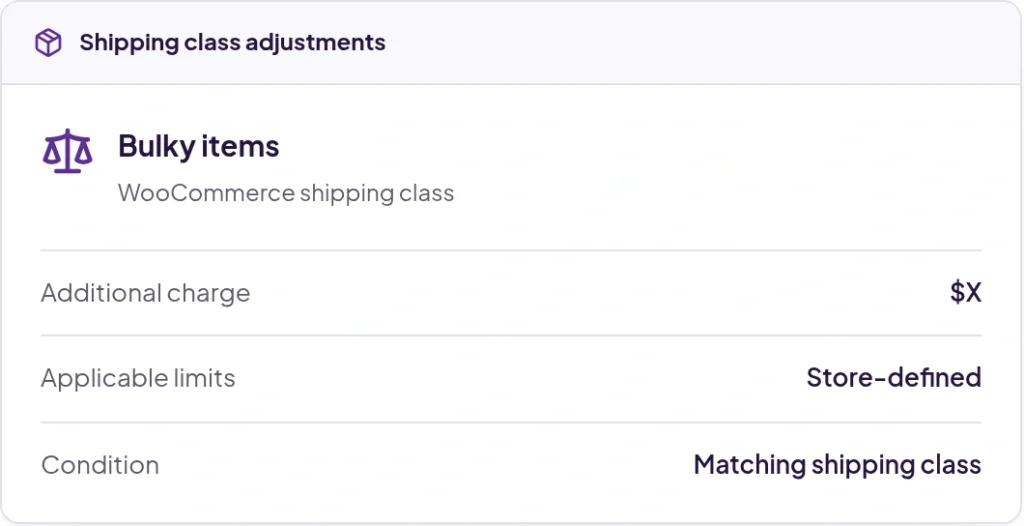
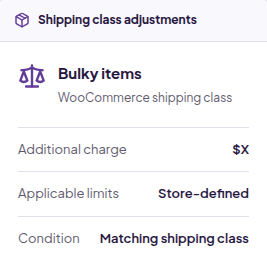
Use WooCommerce shipping classes to account for product types that cost more to deliver, with additional charges and store-defined limits.
Shipping-class adjustments
Additional class-based costs
Configured limits and conditions
More control over your shipping calculations
Multiple custom shipping methods
Distance-based shipping
Weight-based shipping
Cart-total conditions
Quantity-based rules
Volume-based rules
Product conditions
Product-category rules
Product-tag rules
Shipping-class charges
Minimum / maximum limits
Free shipping
Flat-rate shipping
Table-rate style pricing
Conditional method visibility
How it works
From shipping rule to checkout rate
01
Create a shipping method
Set its name and basic configuration.
02
Choose the calculation
Distance, weight, quantity, cart value or volume.
03
Add conditions and limits
Apply product, category, tag or shipping-class rules.
04
Show the checkout rate
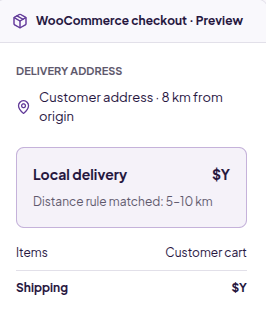
WooCommerce evaluates the cart and customer location.
Range-based logic
Create predictable rates using ranges
Control exactly how charges change as distance or weight increases. Define the boundaries and rates that reflect your delivery costs.
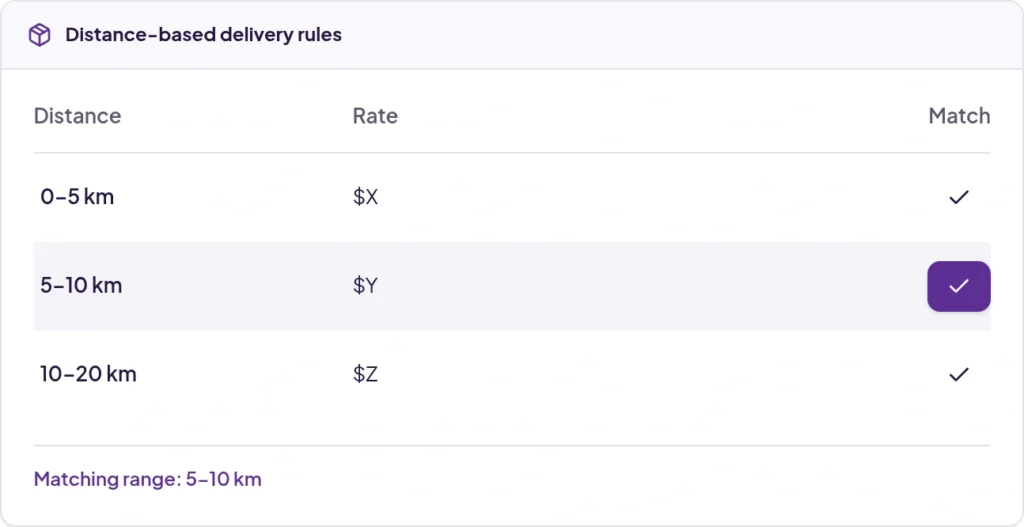
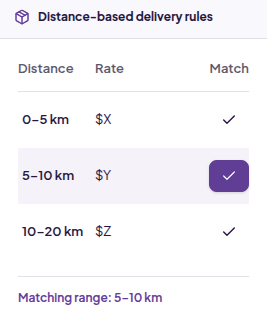
Distance-based delivery rules
Distance
Rate
Match
0–5 km
$X
5–10 km
$Y
10–20 km
$Z
Matching range: 5–10 km
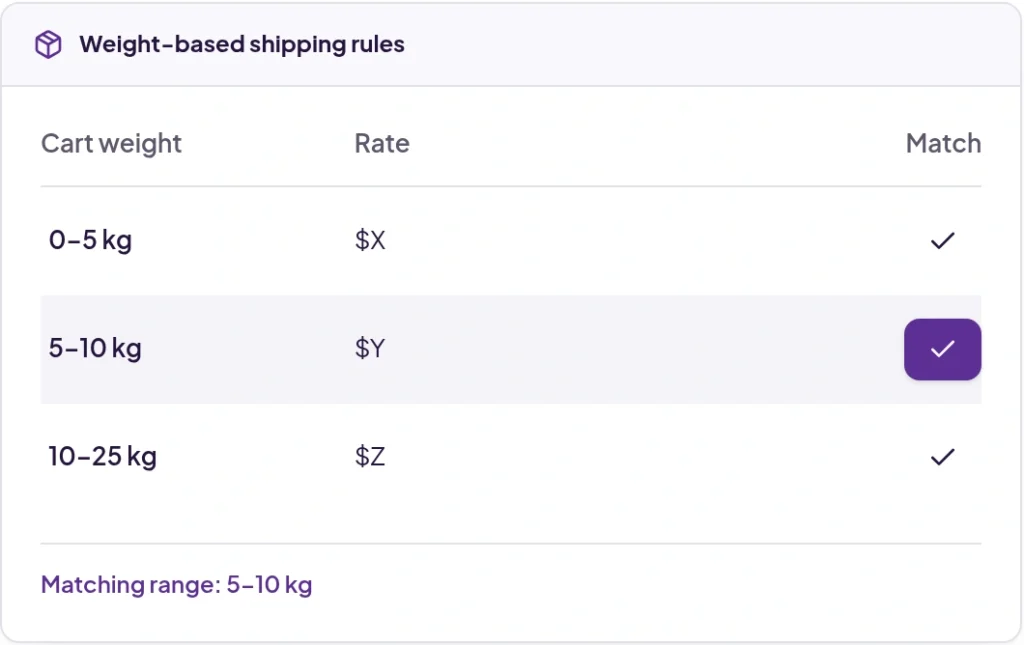
Weight-based shipping rules
Cart weight
Rate
Match
0–5 kg
$X
5–10 kg
$Y
10–25 kg
$Z
Matching range: 5–10 kg
Use cases
Shipping rules for stores with their own fulfilment logic
Price delivery around your own local operation
For stores using their own vehicles, staff or delivery partners.
Capabilities used
Distance pricing
Min/max distance
Flat or range-based charges
1Configure the delivery origin
2Define distance ranges and prices
3Set minimum and maximum distance
4Show the matching rate at checkout
Account for orders that cost more to move
Let weight, volume and shipping classes influence shipping costs.
Capabilities used
Weight
Volume
Shipping classes
1Choose weight or volume calculation
2Define the applicable ranges
3Add shipping-class charges
4Evaluate the customer cart
Delivery rules for non-standard products
Use product and category rules with distance or weight-based pricing.
Capabilities used
Product/category rules
Distance
Shipping classes
1Select products or categories
2Define distance or weight rules
3Configure class adjustments
4Display eligible shipping methods
Structured rates for larger orders
Use quantity or cart value to reflect how your wholesale deliveries work.
Capabilities used
Quantity
Cart value
Custom methods
1Choose quantity or cart value
2Set your limits
3Configure a custom shipping method
4Show rates for qualifying orders
Keep delivery within your operating range
Restrict delivery by minimum/maximum distance and product conditions.
Capabilities used
Distance limits
Product rules
Free or paid delivery
1Define an operating distance
2Set eligible products
3Configure free or paid delivery
4Show methods within the defined range
Method availability
Control when each shipping method is available
Shipping methods do not need to be global rates. Use product, category, tag, cart value, weight and distance conditions to match the order context.
Keep local-only products within your operating range, configure rules for oversized categories or apply limits for heavier carts.
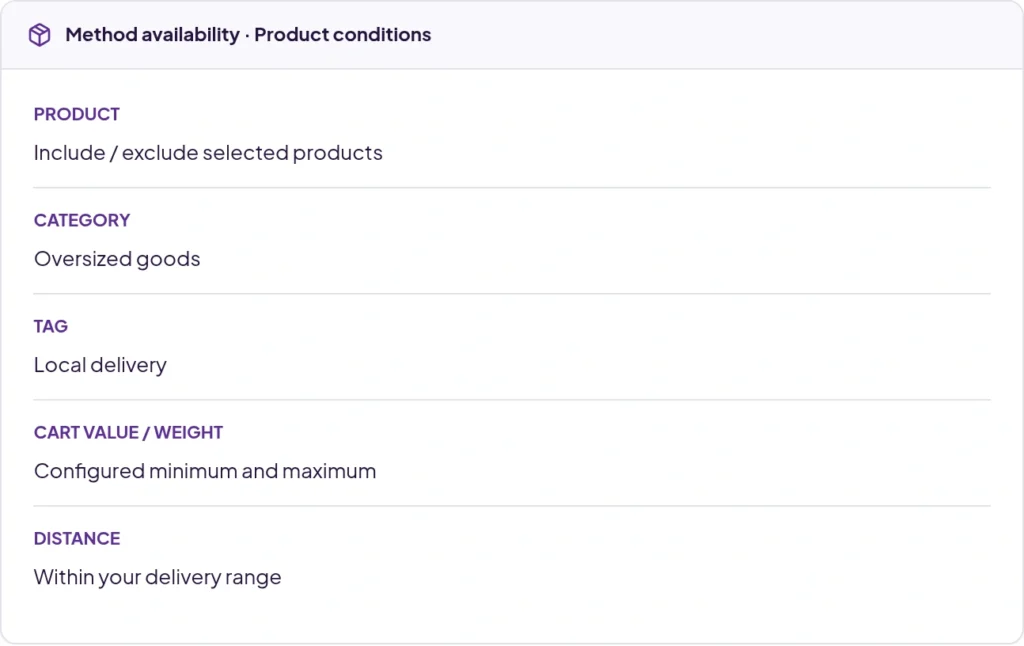
Method availability · Product conditions
Product
Include / exclude selected products
Category
Oversized goods
Tag
Local delivery
Cart value / weight
Configured minimum and maximum
Distance
Within your delivery range
Inside WooCommerce
Configure shipping where you manage your store
Customer proof
Shipping rules backed by helpful support
“The plugin works wonderfully, and support was very timely and helpful when I needed it.”
Jenny BublitzOwner, Bublitz Creative
“In addition to all that, i needed an extra option and these guys added it overnight, impeccable attention, friendly and fast.”
Yeray Moya,
Freelance Web Developer
Pricing
Choose the license that fits your store
The same shipping-rule capabilities. Choose your site limit and annual or lifetime access.
If the plugin does not meet your requirements, you can request a refund within 30 days of the original purchase according to the refund policy.
FAQ
Questions about Custom Shipping Methods
What is Custom Shipping Methods for WooCommerce?
A plugin for creating shipping methods and calculating charges using your store’s own delivery rules.
Can I create multiple shipping methods?
Yes. Configure different custom shipping methods for different delivery requirements.
Can shipping rates be calculated by distance?
Yes. Define distance ranges, minimum/maximum distance and your own rates.
How is customer distance calculated?
The current implementation uses Google Distance Matrix API with the configured origin and customer delivery address.
Does distance calculation use Google Maps?
It uses Google’s Distance Matrix API for distance calculation; the plugin does not provide its own mapping infrastructure.
Can I calculate shipping by weight?
Yes. Use cart/order weight to determine shipping rates.
Can I set minimum and maximum weight?
Yes. Weight limits help control when a method or range applies.
Can I create table-rate style shipping?
Yes. Define structured ranges and thresholds for predictable rate changes.
Can I control shipping by product or category?
Yes. Include or exclude selected products or categories.
Can I create rules using product tags?
Yes. Product tags can be used in shipping availability conditions.
Can I add charges based on shipping classes?
Yes. WooCommerce shipping classes support additional class-based charges.
Can I offer free shipping?
Yes. Configure free shipping around your store’s supported conditions.
Can I create flat-rate shipping?
Yes. Flat rates are supported alongside other calculation options.
Can I restrict shipping to a maximum distance?
Yes. Configure a maximum distance for distance-based shipping.
Is Google Distance Matrix API required for distance calculations?
Yes, for the current distance calculation implementation. Other calculation types do not depend on distance lookup.
Are Google API charges included with the plugin?
No. Google API usage and any applicable API charges are separate from the plugin license.
What support is included?
Annual licenses include one year of support and updates. Lifetime licenses include lifetime support and updates. Check the purchase page for the current renewal policy.
What is the refund policy?
A 30-day money-back guarantee applies to the original purchase according to the refund policy.
We use cookies on our website to give you the most relevant experience by remembering your preferences and repeat visits. By clicking “Accept”, you consent to the use of ALL the cookies.
This website uses cookies to improve your experience while you navigate through the website. Out of these cookies, the cookies that are categorized as necessary are stored on your browser as they are essential for the working of basic functionalities of the website. We also use third-party cookies that help us analyze and understand how you use this website. These cookies will be stored in your browser only with your consent. You also have the option to opt-out of these cookies. But opting out of some of these cookies may have an effect on your browsing experience.
Necessary cookies are absolutely essential for the website to function properly. This category only includes cookies that ensures basic functionalities and security features of the website. These cookies do not store any personal information.
Any cookies that may not be particularly necessary for the website to function and is used specifically to collect user personal data via analytics, ads, other embedded contents are termed as non-necessary cookies. It is mandatory to procure user consent prior to running these cookies on your website.