Enable this payment methodShow instructions in order emailCharge a handling fee
Custom fields for this method
Reference numberTextRequired
Payment dateDateOptional
Purchase orderTextRequired
Checkout — payment methods
Pay with Zelle
Bank transfer (manual)
Pay by invoice — Net 30
Cash on delivery
Zelle reference number
Custom field added to this payment method
Place order
Gateway fee
Subtotal$180.00
Zelle handling fee$2.50
Total$182.50
Multiple Custom Gateways
Create as many manual methods as you need
Custom Fields
Collect details per payment method
Conditional Rules
Control when each method appears
HPOS Compatible
WooCommerce High-Performance Order Storage
Checkout Blocks Compatible
Works with the block-based checkout
Why merchants use it
WooCommerce shouldn't dictate how your customers pay
Plenty of businesses collect payment in ways no standard WooCommerce gateway covers — bank transfers, app-based transfers, invoices, wholesale accounts or store-specific arrangements. This plugin lets you present those methods properly at checkout instead of working around them.
Problem
Need to accept Zelle or another manual payment method?
Solution
Create a custom payment option with your own name and instructions.
Feature used
Custom gateway title, description and instructions
Problem
Need invoice payments for B2B customers?
Solution
Create a dedicated invoice or account-payment method.
Feature used
Custom order status per gateway
Problem
Need different payment methods for different products?
Solution
Control gateway availability using product and category conditions.
Feature used
Product and category restrictions
Problem
Need to charge a payment-handling fee?
Solution
Add an optional fee to the gateway.
Feature used
Gateway fees
Problem
Need information from the customer?
Solution
Add custom fields to the payment method.
Feature used
Custom checkout fields
Core capabilities
Build payment methods around your store workflow
Four capabilities cover most manual and offline payment requirements. Each one is configured from the standard WooCommerce payments settings screens.
01
Multiple custom payment gateways
Create multiple manual or offline payment methods instead of being limited to one gateway. Each method has its own title, description, icon, instructions and order handling.
Separate settings per payment method
Enable or disable methods independently
Present several manual options side by side
Payments — custom methods
Pay with ZelleOn hold
Bank transfer (manual)On hold
Pay by invoice — Net 30Processing
Wholesale accountProcessing
02
Custom checkout fields
Collect information specific to the selected payment method — a transfer reference, a purchase order number or a payment date — and keep it attached to the order.
Fields shown only when the method is selected
Required or optional per field
Values stored with the order for your team
Custom fields for this method
Reference numberTextRequired
Payment dateDateOptional
Purchase orderTextRequired
03
Conditional availability
Control when a gateway appears based on relevant WooCommerce conditions, so customers only see the payment methods that apply to their cart.
“It simply works. Have a whooping 5 Custom Payment Gateways installed on our website. This not only gives the end users more options to pay but also more orders for us.”
Noh BalchaCreative Director, Asmat Product Design
“I used this to create a gateway using Zelle, Apple Pay, Gpay and many others. Worked like a charm. Awesome plugin for my WooCommerce Store.”
Andrew Bossola,
Founder, Oasis Creative
“This plugin works like a charm! I installed the FREE version initially but then I loved it and upgraded to PRO. Good job guys please don’t be tired to continuously support this plugin.”
30-day money-back guarantee. If the plugin does not work for your payment workflow, contact support for a refund within the guarantee period.
FAQ
Frequently asked questions
What is a custom payment gateway?
A payment method you define yourself — a name, description, instructions and rules — that appears at WooCommerce checkout alongside standard gateways.
Does this process payments automatically?
No. It creates manual and offline payment methods. Money is collected outside the store — by transfer, invoice or in person — and the order records the method plus any details the customer submitted.
Can I create more than one gateway?
Yes, Pro supports multiple custom payment methods, each with its own settings. Free version limits are listed in the comparison table.
Can I use this for Zelle?
Yes. Create a method named for Zelle, add your payment instructions and, if needed, a field for the customer’s reference number.
Can I add custom fields?
Yes. Pro lets you add fields to a payment method and mark them required or optional.
Can I charge an extra payment fee?
Yes. A fixed or percentage fee can be applied when a specific payment method is selected.
Can I control which products show a gateway?
Yes. Gateway availability can be limited by product, category, cart value or shipping method.
Is it compatible with HPOS?
Yes, the plugin is compatible with High-Performance Order Storage.
Does it work with Checkout Blocks?
Yes, the plugin is compatible with the block-based checkout.
What happens after the customer selects a manual payment method?
The order is created with the status you configured, your instructions appear on the order-received page and in the order email, and submitted field values are stored with the order.
Is a Free version available?
Yes. The Free version covers a basic custom payment method; Pro adds multiple gateways, fields, fees and conditions.
What support is included?
Pro licenses include email support and plugin updates for the license period.
Collect customer files directly with WooCommerce orders
Add file uploads to WooCommerce products, control what customers can upload,
make files mandatory when required and keep every upload connected to the order.
Illustrative product and upload limits. Selected files stay in this
preview; no order is placed.
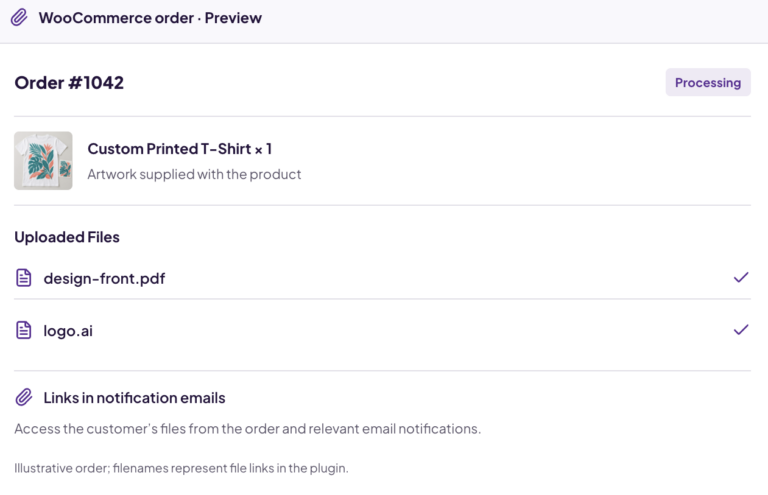
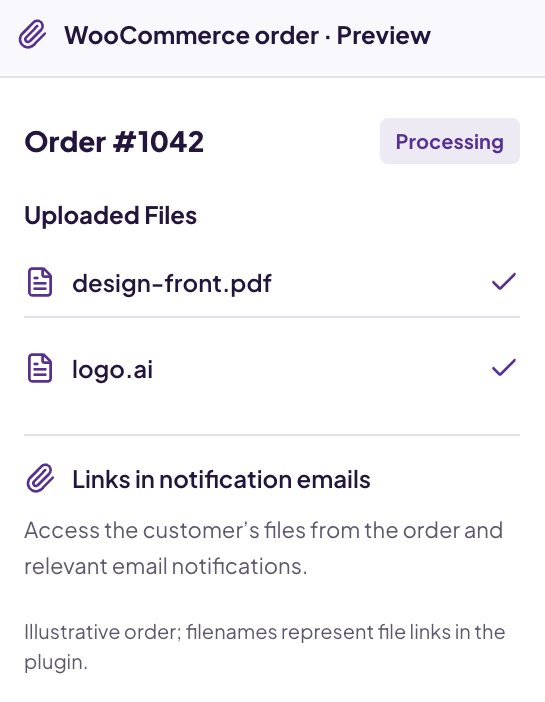
WooCommerce order · Preview
Order #1042
Processing
Custom Printed T-Shirt × 1
Artwork supplied with the product
Uploaded Files
design-front.pdf
logo.ai
Links in notification emails
Access the customer’s files from the order and relevant email
notifications.
Illustrative order; filenames represent file links in the plugin.
Multiple File Uploads
Collect more than one customer file
Required Uploads
Require files before adding to cart
File Validation
Formats, size and image dimensions
Product-Level Rules
Configure uploads by product
Category Rules
Enable selected product categories
Files With Orders
Access files from WooCommerce orders
Files first. Fulfilment next.
Stop chasing customers for files after they place an order
Collect the information production needs while the customer is ordering — not across separate email threads.
Problem
Artwork arrives by email after the order.
Solution
Collect files directly on the product page before the order is placed.
Feature used
Product-page uploads
Problem
Customers forget the file you need.
Solution
Require the upload before the product can be added to the cart.
Feature used
Mandatory uploads
Problem
Wrong formats or dimensions slow down production.
Solution
Validate file types, image dimensions and upload limits.
Feature used
File validation
Problem
Different products need different files.
Solution
Configure uploads for individual products or selected categories.
Feature used
Product & category rules
Problem
An order needs more than one file.
Solution
Allow multiple uploads with minimum and maximum file counts.
Feature used
Multiple-file controls
Problem
Additional files mean additional work.
Solution
Add customer charges based on the number of files uploaded.
Feature used
Per-file charges
Core capabilities
Collect the right files before production begins
A practical upload workflow for personalized, printed and made-to-order products.
01
Collect every file the order requires
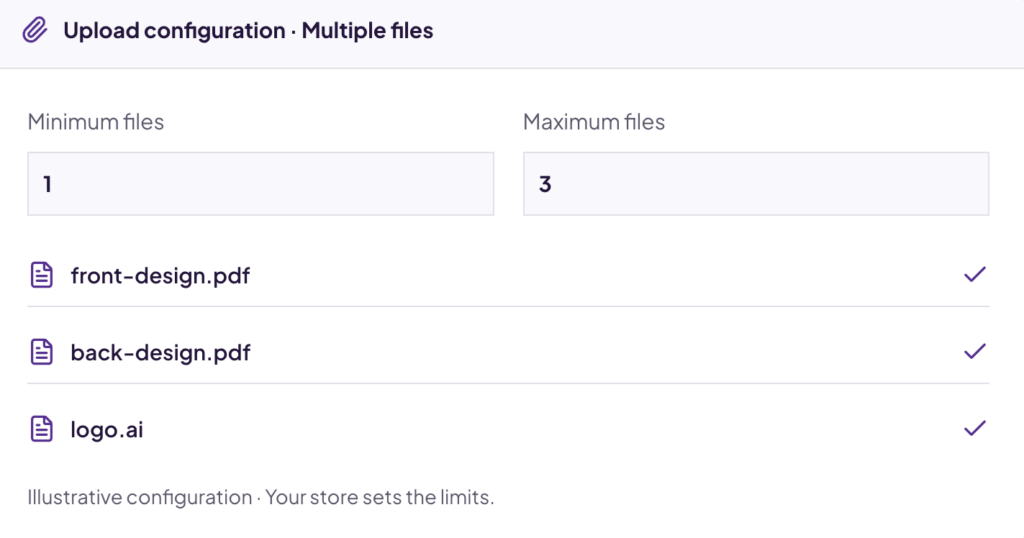
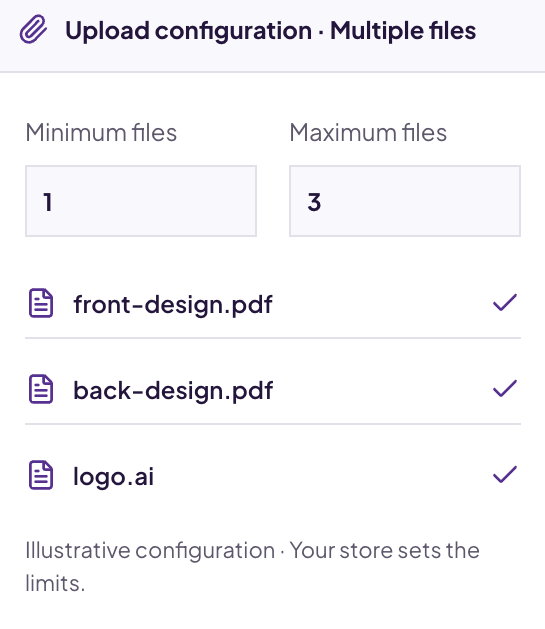
Let customers provide front artwork, back artwork and logos with the product. Set a minimum and maximum file count, using one control or separate fields.
Multiple files through one field
Separate upload fields when needed
Store-defined minimum and maximum counts
02
Don’t accept the order until the required file is attached
Make uploads mandatory when production cannot begin without customer artwork or documentation. Customers see the requirement before adding the product to their cart.
Required or optional by product
Clear upload requirement
No missing-artwork order handoff
03
Accept the files your workflow can actually use
Define accepted file types, size limits and image dimensions. These checks help customers supply usable files; they do not inspect content or guarantee print quality.
Configured file formats
Image width and height limits
File and image size restrictions
04
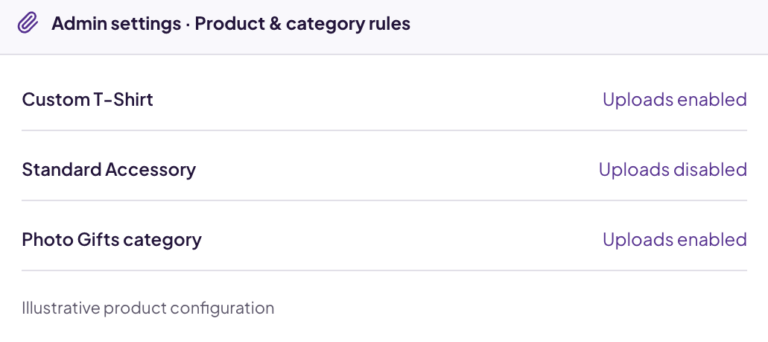
Ask for uploads only where they’re needed
Enable uploads for specific products and product categories. Keep standard accessories simple while collecting artwork for custom products.
Individual product configuration
Product-category configuration
Custom and translatable upload labels
05
Keep customer files connected to the WooCommerce order
Administrators can find file links in order administration and relevant notification emails. Keep order details and production files together.
Links in WooCommerce order administration
File links in notification emails
Less searching across separate messages
06
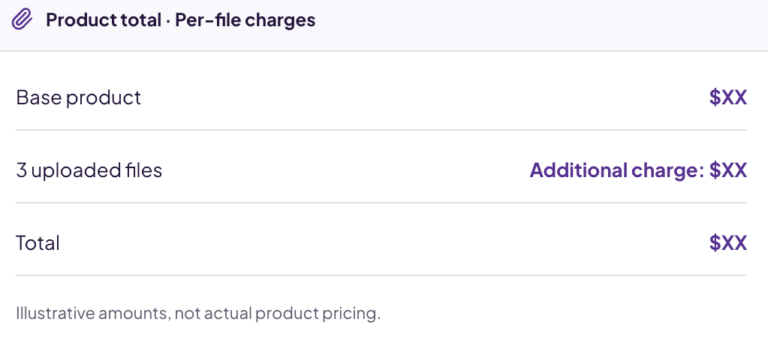
Charge more when customers submit more files
Add charges based on the number of uploaded files where additional submissions create more production work. Configure this for individual products.
Charges based on uploaded file count
Individual product configuration
Reflect additional production work
Also included
Multiple file uploads
Minimum file count
Maximum file count
Required uploads
Product-specific configuration
Product-category configuration
File-type validation
Image width limits
Image height limits
Image / file size limits
Custom upload labels
Translatable labels
Single or multiple fields
Files accessible from orders
File links in notification emails
Per-file customer charges
Custom Add to Cart text
How it works
From customer upload to order fulfilment
01
Configure the requirement
Choose products or categories and define upload rules.
02
Customer selects a product
Show your upload label and requirements on the product.
03
Customer provides the files
Check file count, format, size and image dimensions.
04
Receive files with the order
Access file links in the order and notification emails.
Validation
Prevent unusable files from reaching your production workflow
Set upload requirements so customers provide files that better match what
your team can process.
Allow configured file formats
Set minimum and maximum image dimensions
Limit file and image size
Define minimum and maximum upload counts
Dimension checks apply to images. Validation is not malware scanning or a
guarantee of print quality.
View the original product validation graphic
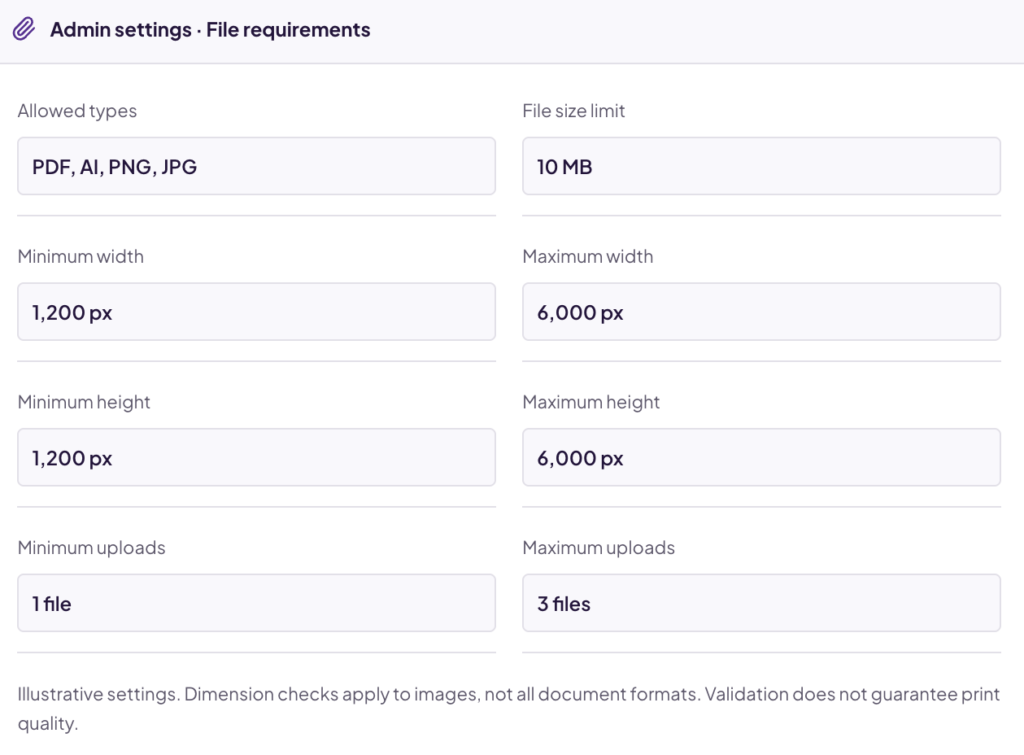
Admin settings · File requirements
Allowed types
PDF, AI, PNG, JPG
File size limit
10 MB
Minimum width
1,200 px
Maximum width
6,000 px
Minimum height
1,200 px
Maximum height
6,000 px
Minimum uploads
1 file
Maximum uploads
3 files
Illustrative settings. Dimension checks apply to images, not all document
formats. Validation does not guarantee print quality.
Use cases
Built for stores that need customer files before fulfilment
Artwork arrives with the product order
For custom apparel, mugs, personalized gifts and printed merchandise.
Capabilities used
Required uploads
Order-linked files
Product rules
1Choose the product
2Upload artwork
3Place the order
4Production accesses the artwork
Upload workflows
One upload field or several — depending on your product
Use the upload configuration that matches what you need to collect. Multiple fields
do not imply conditional or dynamic fields.
A · One control, multiple files
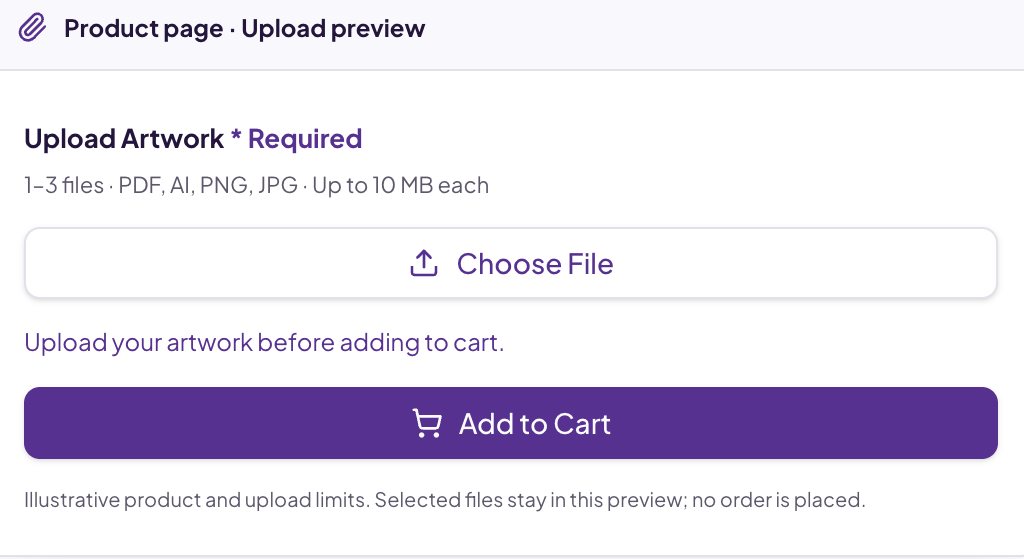
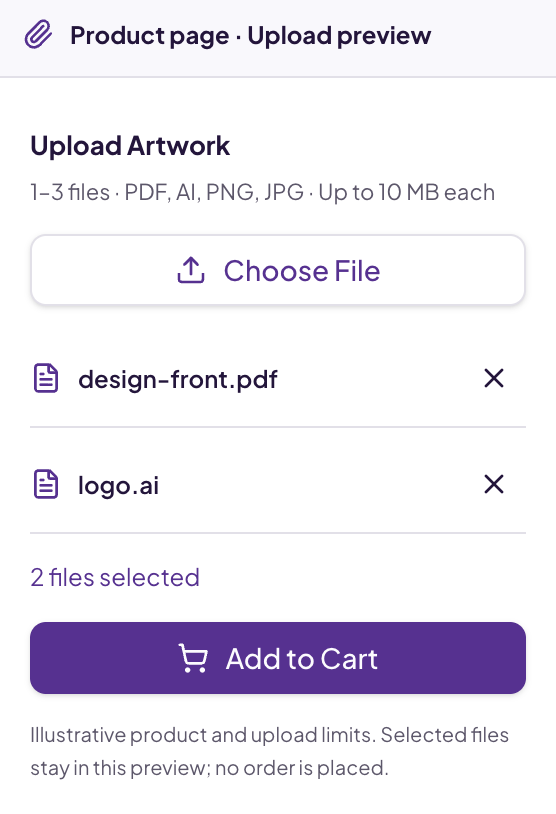
Product page · Upload preview
1–3 files · PDF, AI, PNG, JPG · Up to 10 MB each
design-front.pdf
logo.ai
2 files selected
Illustrative product and upload limits. Selected files stay in this
preview; no order is placed.
B · Separate controls for distinct artwork
Separate upload controls
Illustrative fields. Files stay in this preview.
Order management
Keep files where your team already manages the order
Less searching across email threads and separate file-sharing messages. Customer
files stay associated with the WooCommerce order.
Access file links from order administration
Find file links in relevant notification emails
Hand customer files to your fulfilment team
WooCommerce order · Preview
Order #1042
Processing
Custom Printed T-Shirt × 1
Artwork supplied with the product
Uploaded Files
design-front.pdf
logo.ai
Links in notification emails
Access the customer’s files from the order and relevant email notifications.
Illustrative order; filenames represent file links in the plugin.
Customer stories
Customer files, captured at the right moment
“I am super happy with the plugin. Works as expected. The problem of capturing images for our orders is solved and that has helped us focus on growing the business. Highly recommend to anyone starting a print-on-demand store!”
Your purchase is covered by a 30-day money-back guarantee according to the refund policy.
FAQ
Questions about File Uploads Addon
Can customers upload multiple files?
Yes. Allow several files with configured minimum and maximum file counts.
Can I require customers to upload a file?
Yes. Make uploads mandatory so the product cannot be added to the cart until the required file is supplied.
Can I set a minimum and maximum number of uploads?
Yes. Configure the file-count limits for the upload requirement.
Which file types are supported?
The plugin supports multiple file formats, subject to your configured allowed types and WordPress/server upload restrictions. Check documentation for your required formats.
Can I allow uploads only for certain products?
Yes. Configure uploads at the individual product level.
Can I enable uploads by product category?
Yes. Enable uploads for selected WooCommerce product categories.
Can I customize the upload-field label?
Yes. Custom labels and translatable labels are supported.
Can I validate image width and height?
Yes. Configure image width and height limits. These checks do not guarantee print quality.
Can I limit uploaded file or image size?
Yes. Configure size restrictions for accepted uploads, subject to server limits.
Can I charge based on the number of uploaded files?
Yes. Configure per-file customer charges for individual products.
Where can administrators access uploaded files?
File links are available in WooCommerce order administration.
Are uploaded file links available in WooCommerce emails?
Yes. Relevant notification emails can include file links. This does not mean the files are attached to the email.
Can I use multiple separate upload fields?
Yes. Configure separate upload controls when the product needs distinct files.
Can customers upload several files using one field?
Yes. Multiple files can be provided through a single upload control with configured file-count limits.
Can I customize the Add to Cart button text?
Yes. The plugin supports custom Add to Cart text.
What support is included?
The Single Site plan lists plugin support for one site. Five Sites and Unlimited Sites list priority support. The published pricing table does not clearly specify license duration or renewal; confirm these terms before purchasing.
What is the refund policy?
Your purchase has a 30-day money-back guarantee according to the refund policy.
Product-page snapshot checked October 8, 2026. Values are editable presentation data, not a live WordPress feed; confirm current requirements with the documentation.
Related
More WooCommerce tools from Imaginate Solutions
Custom Shipping Methods for WooCommerce
Calculate delivery costs using your own shipping rules.
Shop managers often want to analyze the sales of the variation products. WooCommerce Variation Reports is a plugin that will help shop managers to view and download the reports of your variations selling in your store.
These reports help shop managers and shop owners analyze and focus on the variations selling in the store and help decision-making about the variations that customers love.
WooCommerce Variations Reports create a statistical analysis of the total sales of a particular variation for a particular product. It is not just restricted to Variable Products sales but also includes other Products sold.
WooCommerce Variations Reports Features:
View Product Sales reports – Both simple and variable (with all the variations)
Copy the reports to the clipboard and paste them anywhere.
Search and sort through the reports.
Variation Reports Menu
Variation Reports Table
Reports Export Options
Pagination Display
WooCommerce Order Export Plugin · AI & MCP Ready
Export Orders Pro
Export WooCommerce Orders to CSV, Excel & More — With AI and Automation
Export exactly the order data you need in CSV, Excel, PDF, XML or JSON. Choose your fields, apply filters and arrange columns to match your workflow.
Want to go further? Connect compatible ChatGPT or Claude clients to WooCommerce through the built-in MCP server, available in the Free version. Upgrade to Pro for scheduled exports, custom metadata, reusable profiles and automatic file delivery.
Stop rebuilding the same WooCommerce reports by hand
Different teams need different data. Build an export once around the task, not around a spreadsheet you have to clean up.
Problem
Accounting needs the same report every month.
Solution
Save a Pro profile, schedule the recurring report and deliver it automatically to your team.
Feature used
Saved Export Profiles · Pro
Problem
Fulfilment doesn't need every order detail.
Solution
Select SKU, quantity, order number and shipping information in the preferred order.
Feature used
Field selection & column ordering
Problem
Different teams need different file formats.
Solution
Create a spreadsheet, PDF report or structured XML/JSON export.
Feature used
CSV · XLSX · PDF · XML · JSON
Problem
Standard fields aren't enough for your report.
Solution
Pro expands the export field library for more detailed workflows.
Feature used
Additional Export Fields
Problem
You know what you need, not which filters to rebuild.
Solution
Describe an export through supported AI tools, then review the interpreted configuration.
Feature used
AI-assisted exports
Problem
Your AI assistant needs focused export tools.
Solution
Use authorized MCP connections to discover fields, preview matching orders and generate exports.
Feature used
MCP-based export workflows
Built for operations
Build exports around the way your business works
Filters, fields, columns and formats work together to produce a file your team can actually use.
01
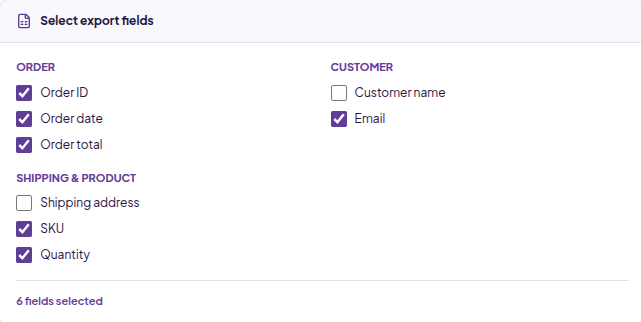
Choose the data your team actually uses
Select order, customer, billing, shipping and product information without filling the export with unnecessary columns.
Grouped fields for easier selection
Order information and customer details
SKUs, quantities, totals and payment information
02
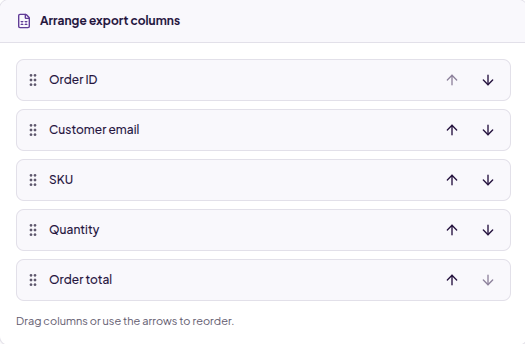
Make the exported file match your workflow
Arrange your columns before exporting. Put identifiers first, keep related data together and match the layout your downstream workflow expects.
Draggable column ordering
Only your selected fields
An export ready for your team
03
Save recurring exports instead of rebuilding them
Pro saves your filters, selected fields, column order and file format as a reusable profile. Monthly accounting and daily fulfilment can each have their own setup.
Available in Pro
Reuse complete export configurations
Separate profiles for different workflows
04
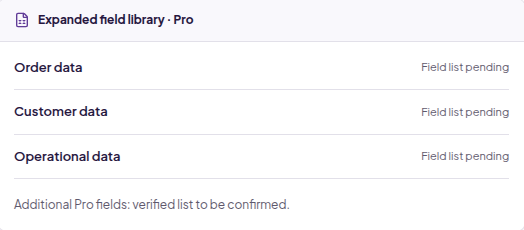
Go beyond the standard export field set
Pro adds export fields for businesses that need more detailed operational reports.
Additional fields available
Expandable export field library
The details that make exports useful
Date-range filtering
Order-status filtering
CSV & Excel / XLSX
PDF reports
XML & JSON
Customer information
Billing & shipping details
Product SKUs & quantities
Order & line totals
Coupon information
Payment information
Draggable column order
Export confirmation
Batch processing
HPOS compatibility
How it works
From WooCommerce orders to the file your team needs
01
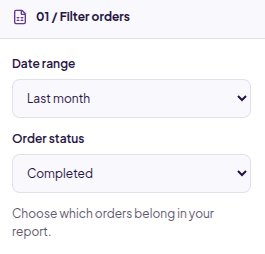
Filter your orders
Choose a date range and order status for the report you need.
02
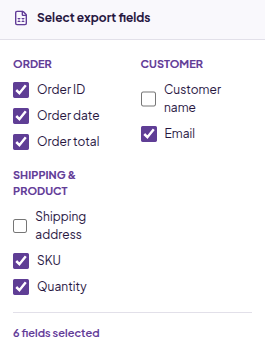
Select your fields
Choose order, customer, shipping and product data.
03
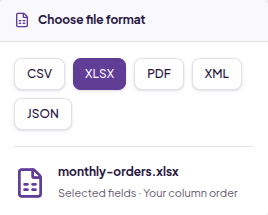
Choose your format
Select CSV, Excel, PDF, XML or JSON for your workflow.
04
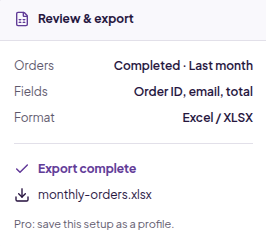
Review and export
Confirm the filters and columns, then generate your file.
Available in Pro
Turn recurring exports into reusable workflows
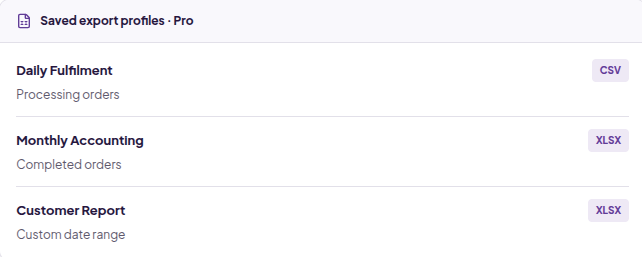
Save commonly used filters, fields, column order and export format as a profile so you do not need to rebuild the same export every time.
CSV
Daily Fulfilment
Processing orders
Order ID · SKU · Qty · Shipping address
XLSX
Monthly Accounting
Completed orders
Order date · Customer · Total · Tax · Payment method
Schedule exports and send them where your team already works
Create recurring export schedules and automatically deliver generated files to supported external destinations without manually downloading and moving files.
Export order IDs, SKUs, quantities, shipping information and shipping methods without unrelated columns.
Capabilities used
Status filters
Selected fields
CSV
Pro profiles
Scheduled delivery
1Filter processing orders
2Choose SKU, quantity and shipping fields
3Export a CSV for fulfilment
4Reuse the configuration with a Pro profile
Prepare structured reports for accounting
Bring together order totals, tax, discounts and payment details for recurring accounting workflows.
Capabilities used
Date filters
Column ordering
Excel / XLSX
1Choose the accounting date range
2Select totals, tax and payment data
3Arrange the reporting columns
4Export an Excel file
Keep day-to-day order reporting practical
Export order and customer information for internal analysis and daily operational reviews.
Capabilities used
Order data
Customer data
Five formats
1Define the orders to review
2Select order and customer fields
3Choose the team's preferred format
4Review and generate the report
Bring customer and order information together
Create focused customer reports using the contact and order information required for your task.
Capabilities used
Customer details
Field selection
Date filtering
1Choose a reporting period
2Select the customer details needed
3Include relevant order information
4Export for your customer workflow
Export structured data for downstream systems
Use XML or JSON when a structured file fits better than a spreadsheet. Choose only the order information the receiving workflow requires.
Capabilities used
XML
JSON
Controlled field selection
1Filter the relevant orders
2Choose the required data
3Select XML or JSON
4Review the file before sharing
AI & MCP
Ask for the export you need
Conversational order-export workflows through AI-assisted tools and MCP-compatible clients. Describe
the report, review the interpretation and choose what to export.
Ask
Review
Export
Core AI & MCP are also in Free.
Free works with standard export fields and core export functionality. Pro gives AI access to a
broader field set and richer export capabilities, alongside reusable profiles, scheduling and
automated delivery.
Free · Core field set
“Export completed orders from last month with order ID, email and total.”
Review interpreted fields and filters before generating or sharing the file. Pro examples describe a
workflow goal; direct AI-triggered scheduling is not confirmed.
Connections require authorization. The workflows shown focus on reading and exporting order data,
not arbitrary editing or deletion. You control the data requested and shared.
Lite vs Pro
Start free. Upgrade when exports become part of your workflow.
Free is a useful manual export tool with standard fields and core AI/MCP. Pro adds more data, more automation and recurring export workflows.
Feature comparison between the Free and Pro versions
If the plugin does not meet your requirements, you can request a refund within 30 days of the original purchase according to the refund policy.
FAQ
Questions about Export Orders
Which export formats are supported?
CSV, Excel / XLSX, PDF, XML and JSON.
Can I choose which WooCommerce fields to export?
Yes. Select the order, customer, billing, shipping and product information required for your export.
Can I change the order of exported columns?
Yes. Arrange your selected fields before generating the file.
Can I filter orders by date and status?
Yes. Date-range and order-status filters help you limit exports to relevant orders.
What are saved export profiles?
Pro profiles store filters, fields, column order and format so recurring exports can reuse the same configuration.
What extra features are included in Pro?
Pro includes Saved Export Profiles, additional export fields, more capable AI-assisted workflows, enhanced MCP, scheduled exports and automatic delivery to Google Drive, Dropbox and Custom FTP.
Can I schedule recurring exports?
Yes. Pro supports scheduled exports and automatic file delivery, so recurring reports do not require repeated setup, downloads or manual handoffs. Exact schedule options should be checked in the product documentation.
Where can Pro deliver exports?
Google Drive, Dropbox and Custom FTP are supported destinations. More destinations planned for future releases.
Is AI or MCP exclusive to Pro?
No. Free includes core AI-assisted exports and MCP functionality with standard export fields. Pro expands field access and export capabilities, enabling richer AI-assisted and enhanced MCP workflows. Direct AI-triggered scheduling is not confirmed.
Which additional fields are available in Pro?
Custom fields, Order Meta Fields and Item Meta fields are available for exports in addition to the standard fields available in lite version
Is WooCommerce HPOS supported?
Yes. Export Orders supports WooCommerce High-Performance Order Storage.
Can I export large numbers of orders?
Batch processing supports larger export jobs. Practical limits depend on the store and hosting environment.
Can I use ChatGPT or Claude with Export Orders?
MCP-compatible clients can support conversational export workflows through an authorized connection.
What is MCP?
Model Context Protocol lets compatible AI clients connect to a defined set of tools, such as order-export tools, through an authorized connection.
Does AI have permission to edit or delete my WooCommerce orders?
The workflows presented here focus on reading and exporting order data, not arbitrary editing or deletion. Review the actual authorized tools and requested data before connecting.
Do I need an AI account for normal exports?
No. Normal manual exports do not require an AI account.
Can I use Export Orders without AI?
Yes. Configure filters, fields, columns and formats directly in WooCommerce.
What support is included?
We help with installation, plugin configuration, export setup, and troubleshooting issues with Export Orders for WooCommerce. If an export isn’t working as expected, contact us with the details and we’ll help investigate.
Custom development, bespoke integrations, and issues caused by other plugins or your hosting environment are outside standard support.
More fields. More capable AI. Reusable profiles. Scheduled exports. Automatic delivery. Turn one-off WooCommerce exports into repeatable data workflows with Pro.
We use cookies on our website to give you the most relevant experience by remembering your preferences and repeat visits. By clicking “Accept”, you consent to the use of ALL the cookies.
This website uses cookies to improve your experience while you navigate through the website. Out of these cookies, the cookies that are categorized as necessary are stored on your browser as they are essential for the working of basic functionalities of the website. We also use third-party cookies that help us analyze and understand how you use this website. These cookies will be stored in your browser only with your consent. You also have the option to opt-out of these cookies. But opting out of some of these cookies may have an effect on your browsing experience.
Necessary cookies are absolutely essential for the website to function properly. This category only includes cookies that ensures basic functionalities and security features of the website. These cookies do not store any personal information.
Any cookies that may not be particularly necessary for the website to function and is used specifically to collect user personal data via analytics, ads, other embedded contents are termed as non-necessary cookies. It is mandatory to procure user consent prior to running these cookies on your website.